Introduction
If you’ve ever watched a live stream that smoothly switches between camera angles, shows overlays like scoreboards, or displays dynamic visuals you’ve already seen video switcher software in action.
At its core, a video switcher helps you:
- Transition between scenes (cuts, fades, wipes)
- Manage multiple camera inputs
- Layer visuals like text, logos, or lower thirds
But here’s the shift happening right now:
Live production is no longer just about switching between sources.
It’s moving from basic switching → to visual storytelling powered by graphics.
Today, audiences expect more than clean transitions. They expect engaging visuals, real-time data, and immersive scenes. That’s why modern workflows are no longer built around just video switching software they combine switching with powerful graphics systems.
In this blog, we’ll explore the top video switcher software for live streaming, while also understanding how switching and graphics are becoming deeply interconnected. 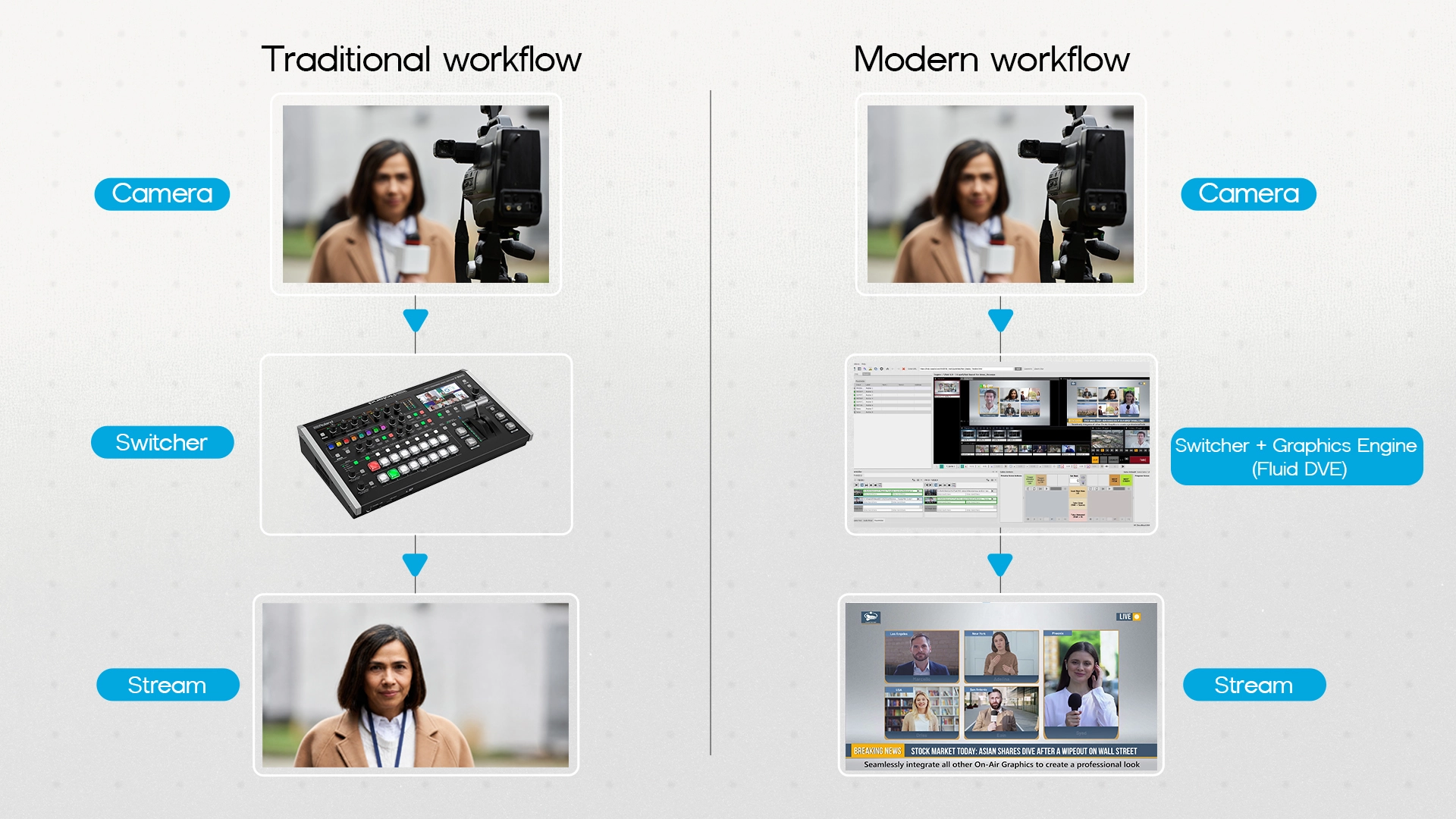
What to Look for in Video Switcher Software
Before choosing any live streaming software, it’s important to know what actually matters. Not every tool fits every workflow.
Ease of Use
A good video switcher software should feel intuitive. Whether you’re a beginner or a professional, you shouldn’t struggle just to switch scenes or manage inputs. Tools with clean UI and logical controls reduce production stress during live streams.
Multi-Source Input Handling
Modern productions often involve:
- Multiple cameras
- Screen captures
- Remote guests
- Media files
Your switching software should handle all these smoothly without lag or confusion.
Real-Time Transitions & Effects
Basic cuts aren’t enough anymore. Look for:
- Smooth transitions
- Built-in effects
- Scene presets
These features help make your stream visually engaging.
Integration with Graphics Systems
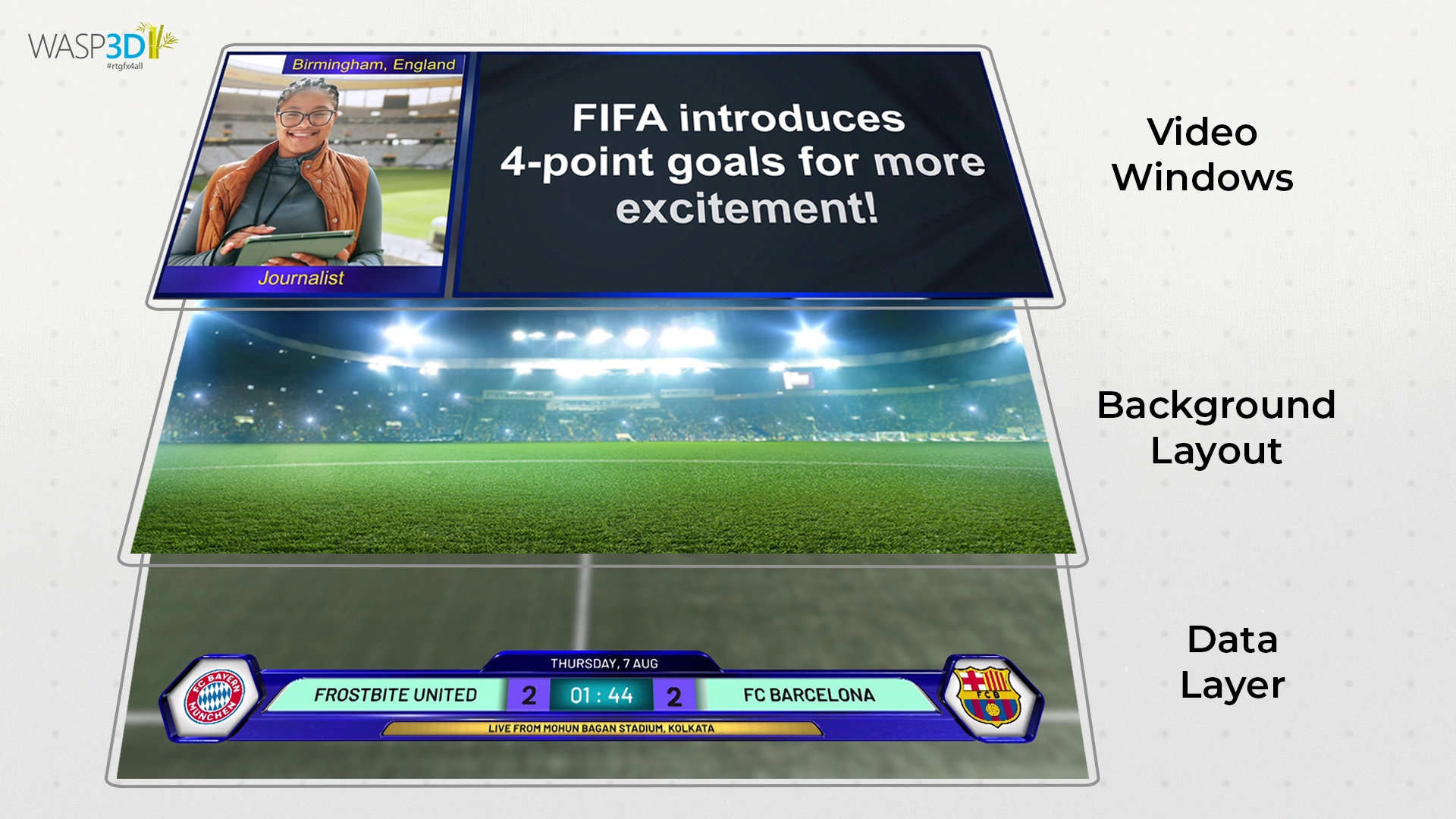
This is where things are evolving fast. Most streaming software includes basic overlays. But if you want advanced visuals like:
- Animated graphics
- Real-time data (scores, stats)
- Complex layouts
You’ll need integration with external graphics systems.
Performance & Latency
Live streaming leaves no room for delay. Your software should:
- Run smoothly under load
- Minimize latency
- Handle high-resolution streams without crashing
Scalability
Your needs today may not be your needs tomorrow.
Some tools are perfect for solo creators, while others are built for full-scale broadcast environments. Choose something that can grow with you.
Top 5 Best Video Switcher Software for Live Streaming
-
vMix
Overview:
vMix is an all-in-one video switching software designed for live production, streaming, and recording.
What makes it strong:
It combines switching, streaming, and basic graphics into one platform. This makes it a popular choice for small to mid-level productions that want everything in one place.
- Multi-camera switching
- Built-in streaming capabilities
- Basic overlays and titles
- Remote guest support
Where it struggles:
As your production becomes more graphics-heavy, vMix starts to show limitations. Its graphics system isn’t deeply customizable, and complex visual storytelling can become difficult. Also, as workflows scale, managing everything inside one tool can get complicated.
Best for:
Small teams, event streamers, and growing creators.
-
OBS Studio
Overview:
OBS Studio is a free, open-source live streaming software used by millions worldwide.
What makes it strong:
Accessibility is its biggest advantage.
- Completely free
- Easy to get started
- Huge plugin ecosystem
- Lightweight and flexible
For beginners entering the world of streaming software, OBS is often the first step.
Where it struggles:
OBS is not built for advanced switching or broadcast-level production.
- Limited native switching capabilities
- Requires plugins for advanced features
- Not ideal for complex, multi-layered productions
Best for:
YouTubers, gamers, and individual creators.
-
Fluid DVE (A Different Kind of Tool in the Workflow)
Fluid DVE is not a traditional video switcher software and that’s exactly why it matters. In modern live production setups, tools like Fluid DVE appear alongside switchers to fill a gap that most switching tools cannot handle.
What makes it unique:
Fluid DVE works as a real-time compositing and graphics layer. Instead of just switching between scenes, it helps you build scenes.
- Layer multiple visual elements
- Create dynamic transitions beyond simple cuts
- Design complex layouts in real time
- Enable visually rich storytelling
Why it’s important:
Most video switching software focuses on:
- Switching feeds
- Managing inputs
But they struggle with:
- Advanced motion graphics
- Data-driven visuals
- Deep layering and composition
Fluid DVE steps in to solve exactly that. It doesn’t replace your switcher it enhances it.
Best for:
Broadcast environments, sports productions, and any workflow where visuals matter as much as the content.
-
Wirecast
Overview:
Wirecast is a professional-grade live streaming software known for its reliability and clean interface.
What makes it strong:
- Easy-to-use interface
- Reliable streaming performance
- Good for live events and webinars
- Built-in production tools
It strikes a balance between simplicity and professional capability.
Where it struggles:
- Requires strong hardware to run smoothly
- Graphics capabilities are still limited compared to dedicated systems
Best for:
Event teams, corporate streams, and mid-level productions.
-
Blackmagic ATEM Software Control
Overview:
Blackmagic ATEM is part of a hardware-based switching ecosystem widely used in professional studios.
What makes it strong:
- Broadcast-grade reliability
- Dedicated hardware performance
- Precise control over switching
This is where production moves from software-based setups to professional studio environments.
Where it struggles:
ATEM systems rely on external tools for advanced graphics.
- Limited built-in graphics
- Requires additional systems for complex visuals
Best for:
Studios, broadcasters, and high-end production setups.
The Common Limitation Across Video Switchers & How Fluid DVE Solves It
No matter which video switcher software you choose, most tools share a common limitation.
They are designed to:
- Switch sources
- Manage inputs
- Control transitions
But they are not built to handle:
- Advanced motion graphics
- Real-time data visualization
- Complex layered compositions
This is where many productions hit a wall. Because today, audiences don’t just want to watch what they want to experience. A full video switcher software guide will help you to understand deeply about switching.
Responsive Multi-Window Switching
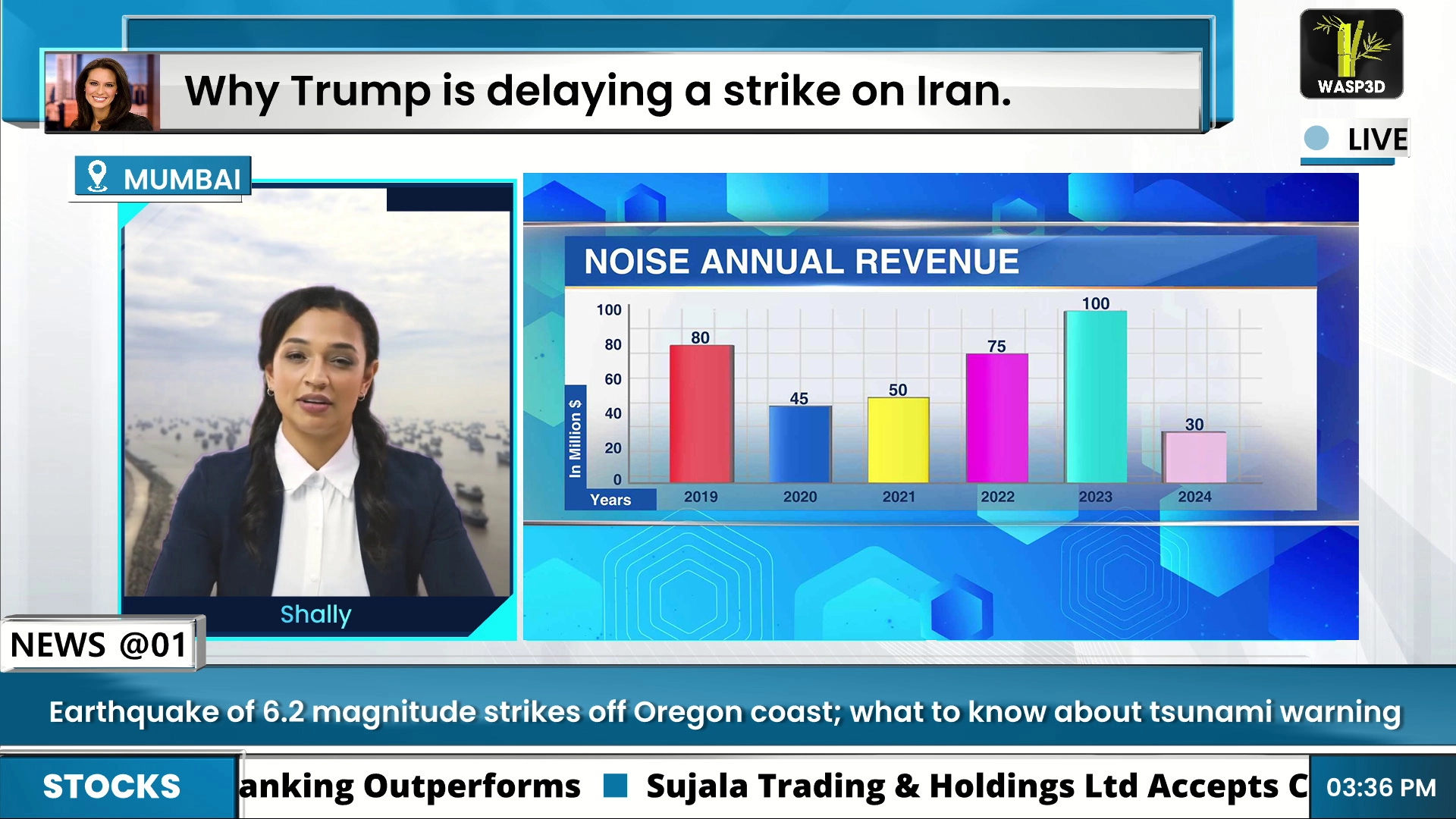
You can create layouts where multiple video sources appear simultaneously and adjust dynamically in real time. Instead of switching scenes, you transform layouts.
Real-Time Video Animations
Animate, resize, compress, and expand video windows on the fly something traditional switchers don’t handle well.
Built-in Streaming
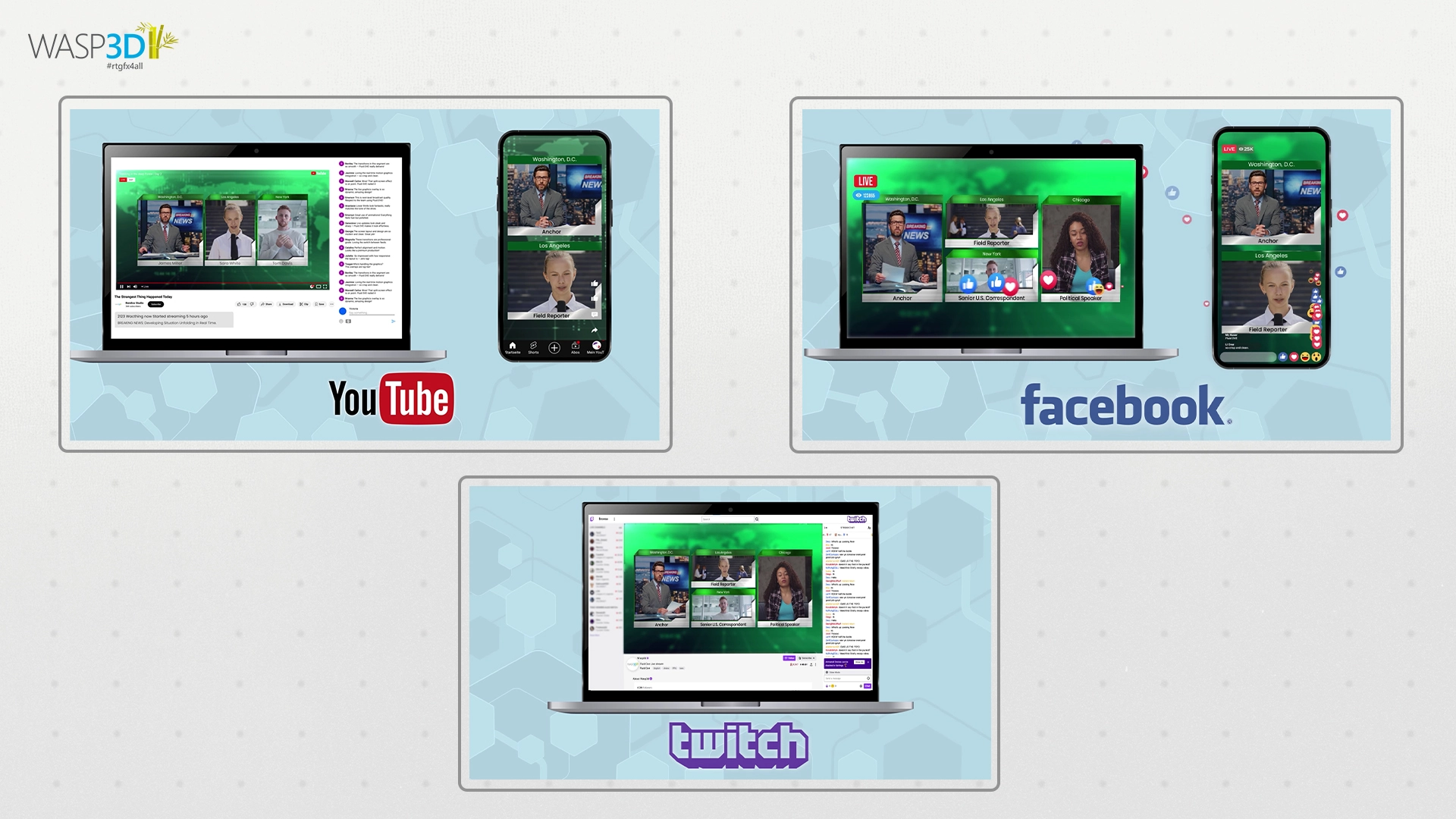
Go live instantly on platforms like YouTube, Facebook, and Twitch without needing separate streaming software.
Versatile Input Handling
Supports:
- SDI
- NDI
- RTMP
- SRT
- Disk media
- Zoom calls (without NDI conversion)
Graphics & Branding Integration
Using WASP3D’s design environment, you can create:
- Tickers
- Name bands
- Full-frame graphics
- Custom branded layouts
Flexible Layout Control
Easily scale and position inputs using simple controls no complex setup required.
Most video switching software is built around:
- Preview → Program → Cut
Fluid DVE is built around:
- Layout → Animate → Transform
That’s a fundamental shift. It allows creators and broadcasters to move from switching content to designing experiences.
What it actually enables:
Instead of switching between static scenes, you can:
- Build layered visual environments
- Create dynamic transitions between elements
- Combine video, graphics, and data seamlessly
For example:
Instead of cutting from Camera A to Camera B, you can create a visual flow where:
- Cameras move within a layout
- Graphics animate in real time
- Data updates dynamically
This transforms your production from technical switching into visual storytelling.
This approach is especially useful in:
- Sports broadcasting
- News production
- Panel discussions
- Live events
- Educational streams
Choosing the Right Setup for Your Needs
There’s no single “best” solution. It depends on your workflow.
All-in-One Software
Tools like vMix and Wirecast combine everything into one system.
Best for:
- Small teams
- Solo creators
- Quick setups
Hardware-Based Switching
Systems like ATEM are built for performance and reliability.
Best for:
- Studios
- Broadcast environments
- High-pressure live productions
Hybrid Workflow (Switcher + Graphics Engine)
This is where modern production is heading.
You combine:
- A video switcher
- A graphics/compositing system like Fluid DVE
Best for:
- Sports broadcasts
- News production
- Data-heavy streams
- High-end visual storytelling
Real-World Use Cases
Different users need different setups.
- YouTubers: Often rely on OBS Studio for simplicity
- Event teams: Use Wirecast for reliable live streaming
- Studios: Prefer ATEM or similar hardware switchers
- Sports & broadcasters: Combine switching with graphics systems for richer visuals
This shows one thing clearly the more complex your content becomes, the more important graphics become.
Final Thoughts: It’s Not Just About Switching
A few years ago, choosing the right video switching software was enough. Today, it’s just the starting point. Switching is still essential it’s the backbone of live production.
But what truly sets a stream apart is the visual experience:
- How information is presented
- How scenes are composed
- How graphics interact with content
That’s why modern workflows are evolving beyond traditional streaming software into integrated systems where switching and graphics work together. If you’re planning your next setup, don’t just ask:
“Which video switcher software should I use?”
Also ask:
“How will I make my content visually engaging?”
Because that’s what your audience actually remembers.
FAQs
1. Which is the best video switcher software for live streaming beginners?
OBS Studio is often the best starting point because it’s free, easy to use, and widely supported. It’s perfect for learning the basics of live streaming.
2. Can video switcher software handle live graphics and overlays?
Yes, most tools offer basic overlays. However, for advanced graphics like animations and real-time data, you’ll need additional systems.
3. Do I need a separate graphics system along with a video switcher?
If your content involves complex visuals, branding, or data-driven elements, then yes a separate graphics system can significantly improve your production quality.
4. Can I use video switcher software for platforms like YouTube, Facebook, and Twitch?
Yes, most modern live streaming software supports direct streaming to platforms like YouTube, Facebook Live, and Twitch. Many tools, including Fluid DVE, allow you to go live in just a few clicks without needing additional software.
5. Is OBS Studio enough for professional live streaming?
OBS can handle many professional scenarios, but for high-end broadcast workflows, you’ll likely need more advanced tools and integrations.