Live sports broadcasts are more competitive than ever. Whether you’re producing a high school football game in Texas, an NCAA basketball matchup, a local baseball tournament, or an esports championship, viewers expect professional-quality graphics that enhance the viewing experience. One of the most important graphic elements in any production is the lower third.
Sports Lower Thirds help broadcasters identify players, display statistics, introduce commentators, highlight sponsors, and provide real-time information without distracting from the action. When designed correctly, they improve engagement, strengthen branding, and make broadcasts look more polished and professional.
In this guide, we’ll explore what professional sports graphics are, how they are used in live productions, how to animate them effectively, and where broadcasters can find sports lower third templates and free resources.
What Are Sports Lower Thirds?
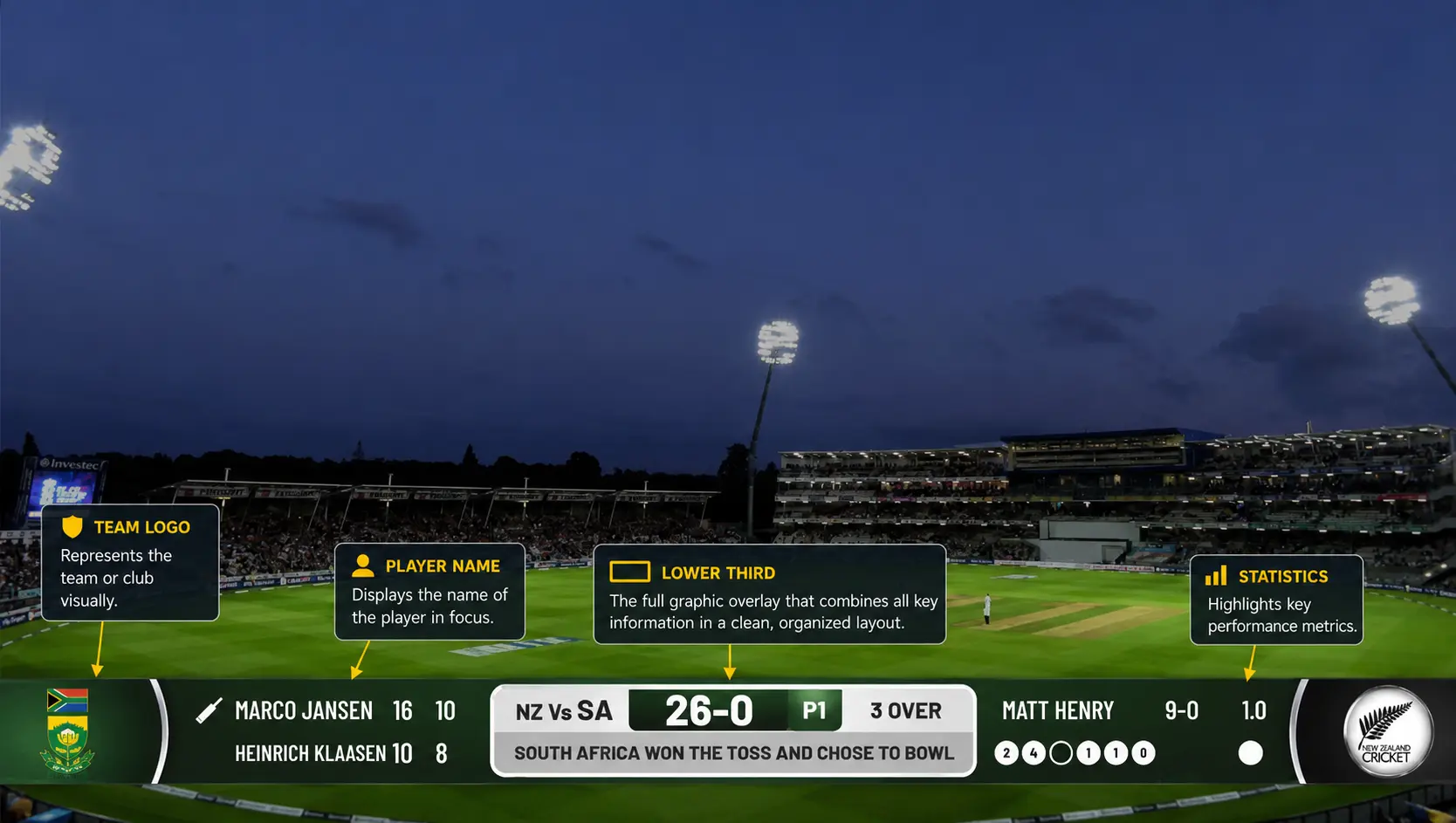
Sports lower thirds are graphic overlays that appear in the lower portion of a broadcast screen. Their primary purpose is to communicate information while allowing viewers to continue watching the game or event.
These graphics are commonly used to display:
- Player names and jersey numbers
- Team information
- Match statistics
- Commentator introductions
- Sponsor messages
- Breaking updates
- Game highlights
From NFL and NBA broadcasts to local high school sports streams, sports lower third graphics have become a standard part of modern sports production.
Unlike full-screen graphics, lower thirds provide information without interrupting the viewing experience. This makes them one of the most valuable assets in any live sports graphics package.
Why Are Sports Lower Thirds Important for Sports Broadcasts?
Sports fans want information quickly and clearly. During a fast-paced game, viewers may join a broadcast late, switch channels, or tune in midway through a stream. Lower thirds help provide context instantly.
For example, if a player scores a touchdown or hits a game-winning three-pointer, a lower third can immediately display the player’s name, season statistics, and relevant highlights.
Sports broadcast lower thirds also contribute to the following:
How Sports Lower Thirds Improve Viewer Engagement
Well-designed graphics keep viewers informed and connected to the action. The easier it is for audiences to follow players, teams, and storylines, the longer they tend to stay engaged.
Sports Lower Thirds for Professional Branding
Major networks invest heavily in graphics because they reinforce brand identity. Consistent lower thirds create a professional appearance that builds trust with viewers.
Sports Lower Thirds Create Sponsorship Opportunities
Many sports organizations use lower thirds to showcase sponsors. This creates additional revenue opportunities while keeping advertisements integrated into the viewing experience.
Sports Lower Thirds Improve Sports Storytelling
Sports broadcasting is about more than showing the game. It is about telling the story behind the athletes, teams, and moments. Lower thirds help deliver that story in real time.
What Makes an Effective Sports Lower Third Design?
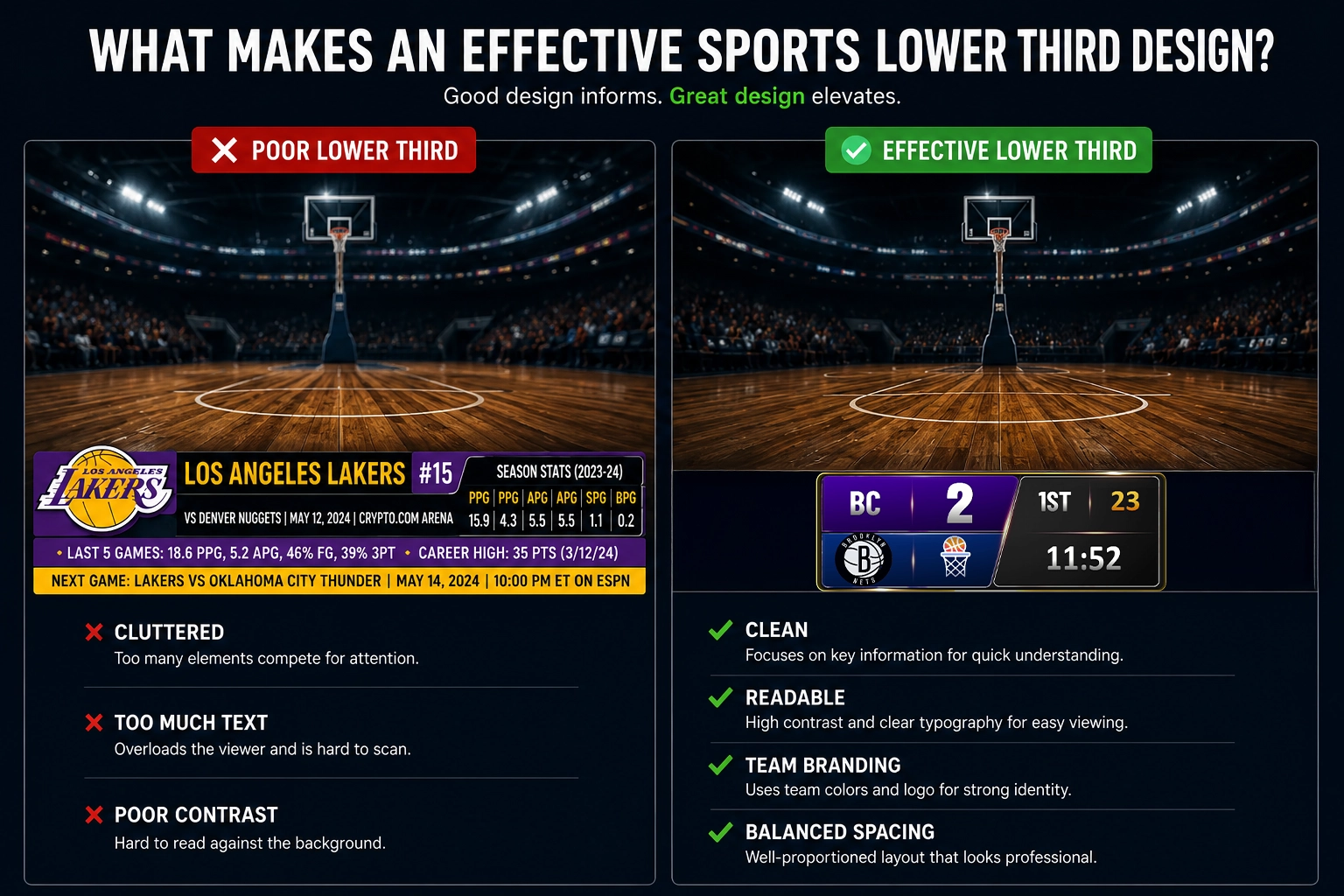
Creating effective broadcast graphics solutions requires balancing visual appeal with readability.
See Professional Sports Lower Thirds in Action
Want to see how professional animated lower thirds, scrolling tickers, countdowns, and overlays come together in a live production? Watch the video below to explore how modern broadcast graphics are designed and used for engaging livestreams.
Watch the video:
The best sports lower third graphics typically include the following:
Sports Lower Third Typography Best Practices
Viewers should be able to read information instantly, even on mobile devices. Sans-serif fonts are commonly used because they remain legible at various screen sizes.
Team Branding in Sports Lower Thirds
Colors, logos, and graphic elements should align with the team’s visual identity. Consistent branding improves recognition and creates a more professional presentation.
Sports Lower Third Layout Guidelines
A cluttered graphic can distract viewers from the game. Keep layouts clean and organized so information remains easy to understand.
Motion Design for Sports Lower Thirds
Animation should enhance the graphic rather than become the focus. Smooth transitions help maintain a professional look without pulling attention away from the action.
Responsive Sports Lower Third Design
Modern broadcasts are viewed on televisions, laptops, tablets, and smartphones. Lower thirds should remain readable across all screen sizes.
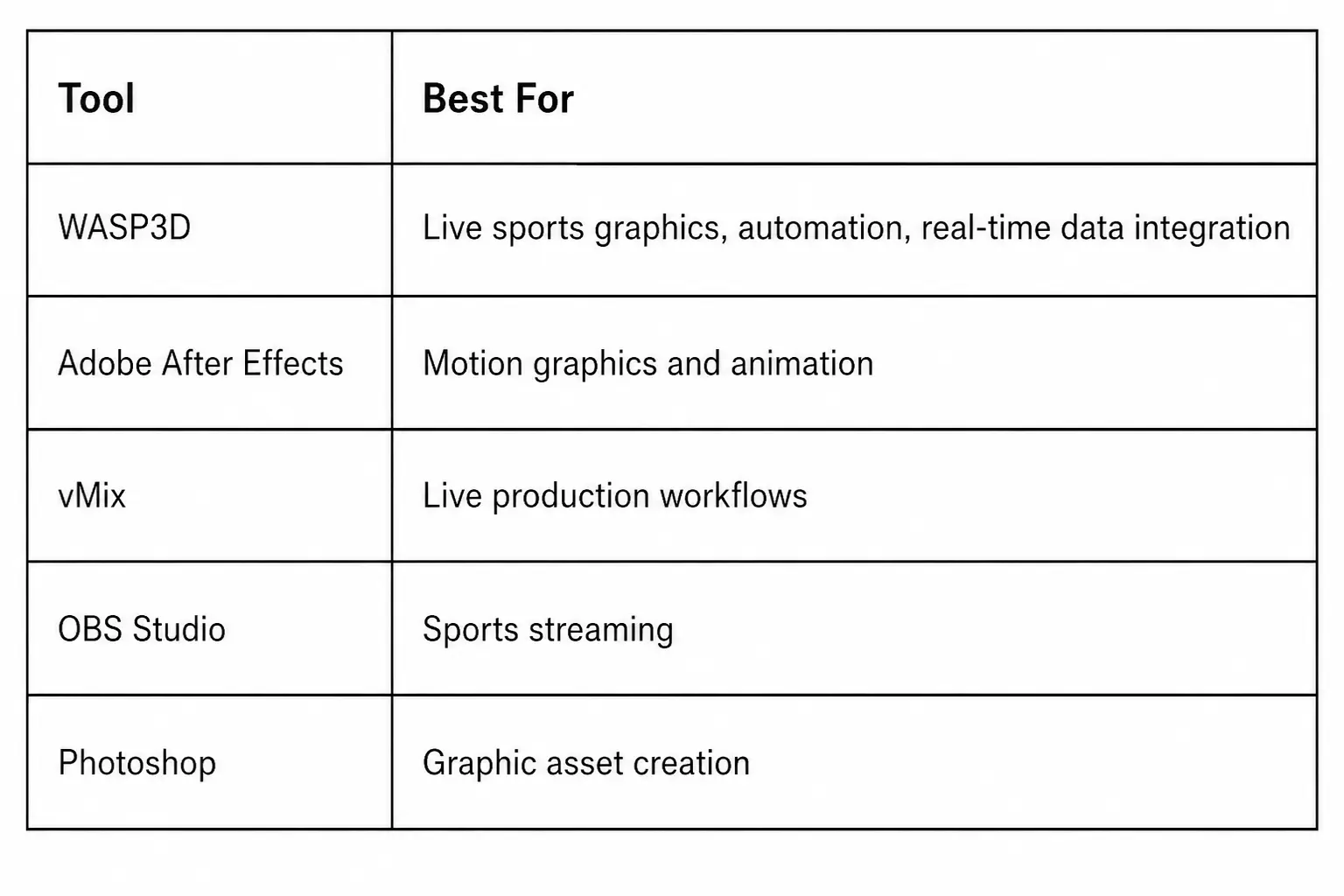
What Are the Best Tools to Design Sports Lower Thirds?
Different tools serve different production requirements. Some are built for graphic design, while others are designed specifically for live sports broadcasts.
WASP3D for Professional Sports Lower Third Graphics
WASP3D is designed specifically for broadcasters who need dynamic, real-time sports graphics. The platform enables teams to create sports lower thirds, scoreboards, player profiles, sponsor graphics, match statistics, and automated data-driven visualizations for live productions. Unlike traditional design tools, WASP3D is built for broadcast environments where graphics need to update instantly during the event.
Adobe After Effects for Sports Lower Third Animation
Adobe After Effects is widely used for creating animated lower thirds and custom broadcast graphics. It offers extensive creative flexibility but often requires manual workflows.
vMix for Sports Lower Third Production
vMix supports live video production and allows operators to integrate graphics into sports broadcasts.
OBS Studio for Sports Lower Third Graphics
OBS Studio is commonly used by streamers and smaller organizations looking for a cost-effective production solution.
Adobe Photoshop – Best for Graphic Asset Creation
Photoshop is frequently used to create graphic elements before they are animated or integrated into a broadcast workflow.
How Are Modern Sports Broadcasters Automating Lower Third Graphics?
As sports productions become more complex, many broadcasters are moving beyond static graphic workflows and adopting real-time graphics solutions. Modern platforms such as WASP3D allow production teams to automate real-time sports graphics, player introductions, scoreboards, sponsor graphics, and statistical overlays directly from live data sources.
This approach reduces manual graphic operations during a live game while ensuring that information remains accurate and up to date. Whether broadcasting a high school football game, a college basketball tournament, or a professional sporting event, automation helps production teams deliver a more professional viewer experience.
How Can You Create an Engaging Sports Lower Third?
The most engaging sports lower thirds combine design, motion, and real-time data.
Start by identifying the information viewers care about most. During a football broadcast, audiences may want player statistics and scoring updates. During a baseball game, viewers may be more interested in batting averages and pitching performance.
Focus on simplicity. Many successful broadcasters follow the principle that viewers should understand the graphic within two seconds.
Use contrast effectively. White text against darker backgrounds often provides the best readability during live sports broadcasts.
Animations should be smooth and consistent. Graphics that slide, fade, or reveal information naturally tend to feel more professional than overly complex animations.
Finally, ensure that graphics align with the pace of the sport. Fast-paced sports such as basketball and hockey often benefit from quick transitions, while slower sports may allow for longer display times.
How Do You Animate a Lower Third for a Live Sports Show?
Animation plays a critical role in creating modern sports graphics.
When designing animated sports lower thirds, broadcasters typically focus on three stages:
Entrance Animation
The graphic enters the screen smoothly, often using a slide-in or fade-in effect. This transition should feel natural and avoid distracting viewers.
Information Display
Once on screen, the graphics should remain stable and easy to read. Excessive movement during this phase can reduce readability. However, to animate numbers in scoreboards like football score bugs, basketball scoreboards, or any other, here is a complete video depicting the step-by-step process.
Animate Numbers in Your Sports Scoreboard
Want to make your scoreboard feel more dynamic and professional? Watch the video below to learn how to animate score changes, timers, and other numerical elements in just a few minutes using free sports graphics software.
Watch the step-by-step tutorial below:
Exit Animation
The graphic exits cleanly, making room for future content without disrupting the broadcast.
Professional broadcasters frequently use motion graphics software to create these animations. Many organizations also automate lower third animations using real-time graphics systems connected to live data feeds.
This approach allows statistics, player information, and game updates to appear automatically during live productions.
Where Can You Find Sports Lower Third Free Resources?
Many creators search for Sports Lower Third Free resources when launching a new broadcast.
Free templates can be found on various graphic marketplaces and design communities. While these resources may be useful for beginners, they often have limitations in terms of customization, branding, and uniqueness.
Organizations that broadcast regularly typically move toward custom graphics packages that better reflect their brand identity.
When evaluating sports lower third templates, consider:
- Customization options
- Animation quality
- Resolution support
- Compatibility with production software
- Branding flexibility
The best templates should allow broadcasters to update colors, logos, fonts, and animations without extensive redesign work.
What Are the Common Mistakes to Avoid When Designing Sports Lower Third Graphics?
Even experienced designers occasionally make mistakes that reduce graphic effectiveness.
One common issue is overcrowding the graphic with too much information. If viewers need several seconds to understand the content, the design is likely too complex.
Another mistake is using poor color contrast. Text should remain readable under various viewing conditions.
Inconsistent branding can also weaken professionalism. Fonts, colors, and layouts should remain consistent throughout the broadcast.
Excessive animation is another frequent problem. Graphics should support the broadcast, not compete with it.
Finally, many broadcasters overlook mobile viewers. As more sports content is consumed on smartphones, graphics must remain clear on smaller screens.
What Is the Future of Sports Lower Third Graphics?
The future of sports graphics is increasingly driven by automation and real-time data integration.
Artificial intelligence, cloud production workflows, and automated graphics systems are transforming how broadcasters create and manage visual content.
Modern solutions can automatically populate player statistics, trigger lower thirds based on game events, and update graphics in real time without manual intervention.
This technology allows production teams to focus more on storytelling and less on graphic management.
As sports broadcasting continues to evolve, broadcast graphics technology will remain a critical component of viewer engagement. However, the graphics themselves will become smarter, faster, and more data driven.
Conclusion
Sports Lower Thirds are much more than simple on-screen graphics. They help broadcasters tell stories, engage viewers, strengthen branding, and delivering information in real time.
Whether you’re producing a local high school football stream, a college basketball broadcast, a professional sports event, or an esports tournament, effective lower thirds can dramatically improve production quality.
By focusing on clean design, purposeful animation, responsive layouts, and automated workflows, broadcasters can create professional sports with lower third graphics that elevate every viewing experience.
As audience expectations continue to rise, broadcasters need graphics that are fast, engaging, and data-driven. Solutions such as WASP3D help sports organizations automate lower thirds, scoreboards, player statistics, and sponsor graphics while maintaining broadcast-quality production standards. For teams looking to enhance their sports broadcasts, investing in professional lower third graphics and automation technology can significantly improve both viewer engagement and operational efficiency.