HTML Sports Graphics vs Broadcast Graphics Engines: What Producers Should Know
Live Sports Graphics are no longer limited to large television networks. In today’s world, leagues, clubs, creators, and broadcasters produce live sports content across YouTube Live, Facebook Live, and major livestream platforms. Along with this shift comes a growing expectation: professional-quality visuals that update live, look polished, and remain stable on air.
To meet this demand, many productions experiment with HTML-based stream overlays. They are marketed as flexible, quick to deploy, and often free. However, live sports production operates under different constraints than web design. Browsers were originally built for interactive webpages — not continuous, real-time broadcast environments where reliability is critical.
This is where the difference between HTML overlays and broadcast graphics engines becomes important.
Why Many Producers Start with HTML Graphics
HTML graphics are popular because they are:
- Flexible
- Web-friendly
- Customizable
- Often low-cost
For small streams or web-first productions, HTML overlays are often sufficient.
When people discuss Live Sports Graphics, HTML overlays are frequently presented as the “flexible” and “free” option. On paper, that sounds appealing — especially for productions streaming on YouTube Live, Facebook Live, or similar platforms.
However, as production complexity increases — particularly in sports environments — workflow limitations may begin to surface.
This article explains those practical differences, specifically in the context of sports production.
Native 2D & 3D Objects vs Web-Based Layout Elements
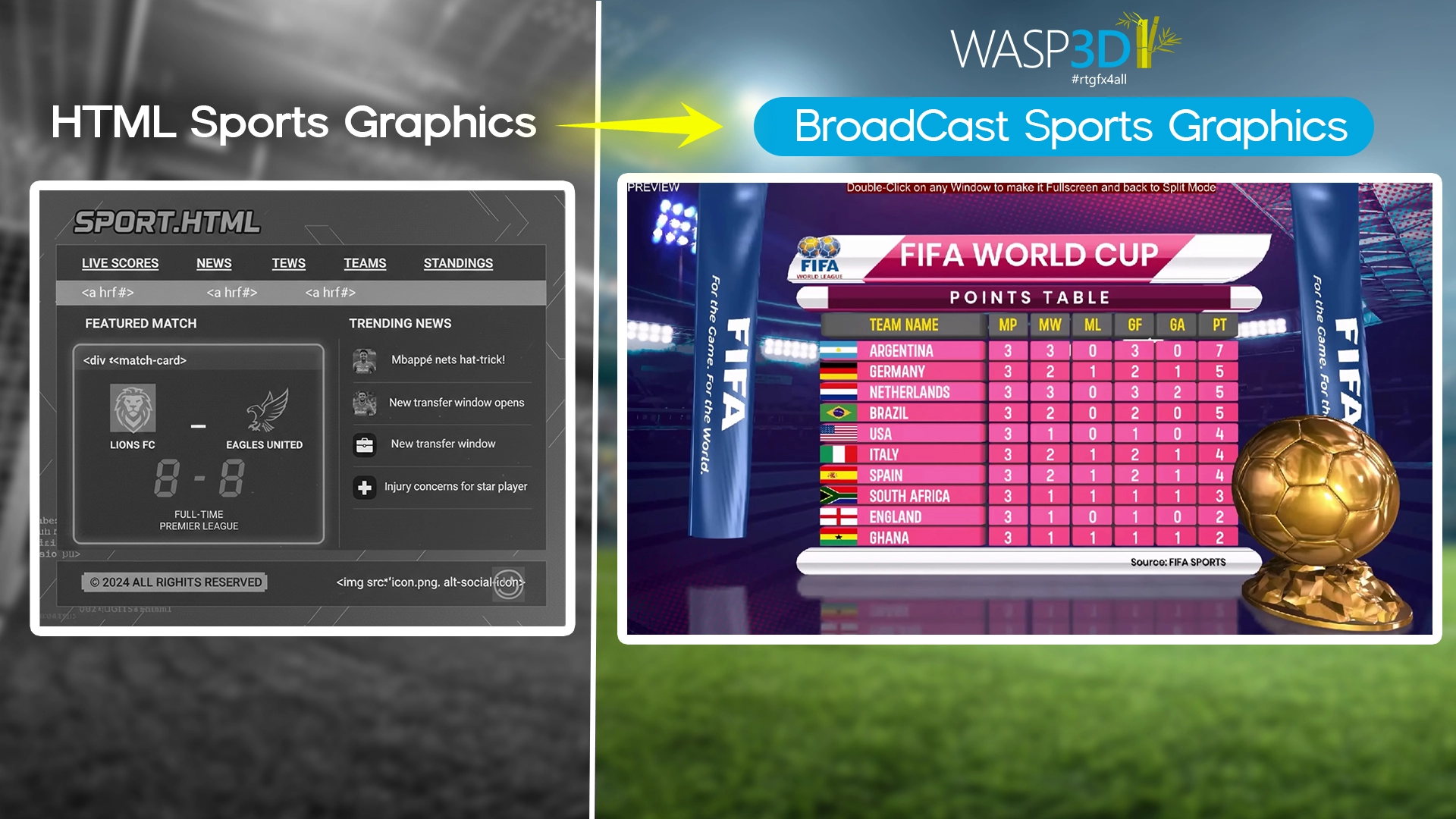
One of the core differences between HTML graphics and broadcast graphics engines lies in how visual elements are constructed.
In HTML workflows, graphics are typically built using:
- Div containers
- SVG elements
- CSS styling
- Web fonts and image assets
This approach is flexible and works well for browser-based overlays. Designers comfortable with web technologies can create visually strong layouts using these tools.
Broadcast graphics engines are structured differently.
An engine-based system such as WASP3D Xpress renders geometry directly inside its graphics pipeline. Objects, text, and shapes behave as structured scene elements rather than styled webpage components.
WASP3D Xpress includes a library of ready-to-use 2D and 3D objects native to its rendering engine, including:
- 3D primitives such as cubes, spheres, cylinders, and rings
- Lines, polylines, and freehand shapes
- Circles, ellipses, rectangles, polygons, stars, and gears
- Helix and curved geometry
- 2D and 3D text objects
- Built-in line graphs and pie charts
- Utility elements like analog clocks
Instead of styling flat layout containers, users work with geometric objects inside a render engine.

Why This Structural Difference Matters
With HTML overlays, visual elements are interpreted and rendered by the browser. Scaling, responsiveness, and animation behavior depend on:
- Browser implementation
- CSS handling
- System resolution
- GPU/browser interaction
For simple overlays, HTML may be sufficient.
For layered sports graphics involving animated data and repeated use across shows, engine-native objects can provide more predictable rendering behavior over time.
Texture Capabilities: Web Assets vs Engine-Managed Textures
Textures are fundamental in sports graphics — from team logos and player images to sponsor backgrounds and live video inserts. How a system manages these textures affects stability, flexibility, and workflow efficiency.
Texture Handling in HTML Graphics
In HTML overlays, textures are typically added <img> or <video> tags along with CSS backgrounds. This works well in browser-based workflows.
Because rendering occurs inside a browser, behavior such as transparency, scaling, layering, and media playback depends on browser handling and system performance. For straightforward overlays, this is manageable. As complexity increases — particularly with multiple animated layers or live inputs — maintaining consistency may require additional testing and monitoring.
Texture Handling in WASP3D Xpress
WASP3D Xpress manages textures inside a dedicated graphics engine.
Key capabilities include:
- A Texture Pool for centralized asset management
- Placeholder Textures for dynamic updates
- Render Textures for live internal composition
- Network Stream Textures (including NDI input support)
Instead of treating images and videos as webpage elements, textures function as structured broadcast inputs within the rendering pipeline.
For web-only streams, HTML workflows are often sufficient. For productions involving frequent sponsor changes, dynamic data-driven graphics, or embedded live feeds, an engine-level texture system can provide more consistent asset control.
Both approaches are valid — the choice depends on production scale and repeatability.
Materials and Visual Depth: Web Styling vs Engine-Based Shading
In HTML graphics, visual styling is created using colors, gradients, shadows, and CSS effects. This allows designers to build clean overlays quickly.
However, browser styling primarily operates in a 2D rendering context.
Broadcast graphics engines approach visuals differently.
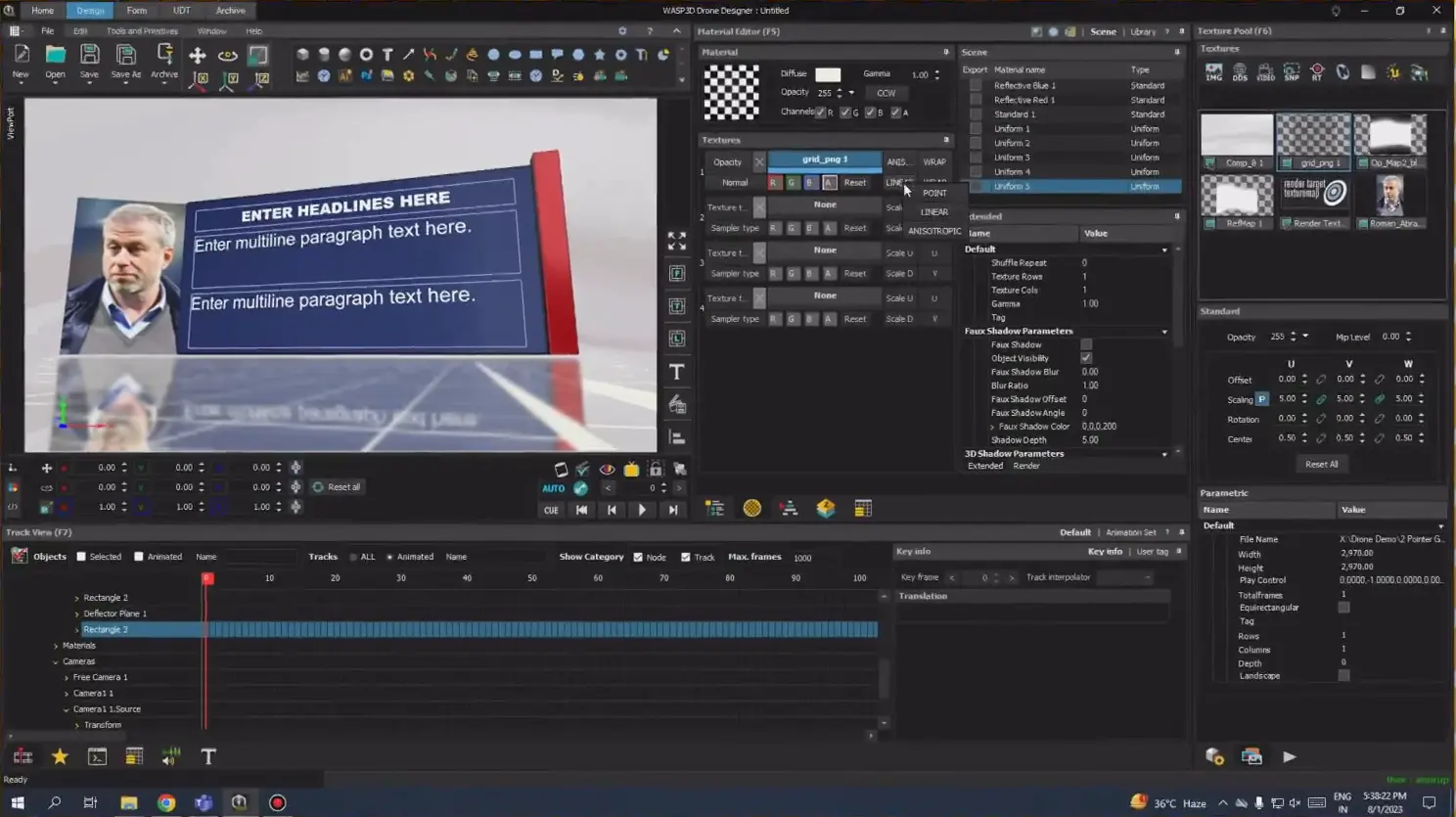
In WASP3D Xpress, objects use a material system rather than simple color styling. Through a built-in Material Editor, materials can be assigned to individual objects and controlled through textures.
Shading is calculated within the rendering engine, allowing elements to respond consistently to light, depth, and perspective.
The difference becomes visible in how graphics appear on-air. Engine-based materials often provide more consistent color reproduction and clearer separation between layered elements — particularly in animated sports graphics.
The distinction lies in how surface behavior is generated: web styling simulates depth, while a graphics engine calculates it within a controlled rendering environment.
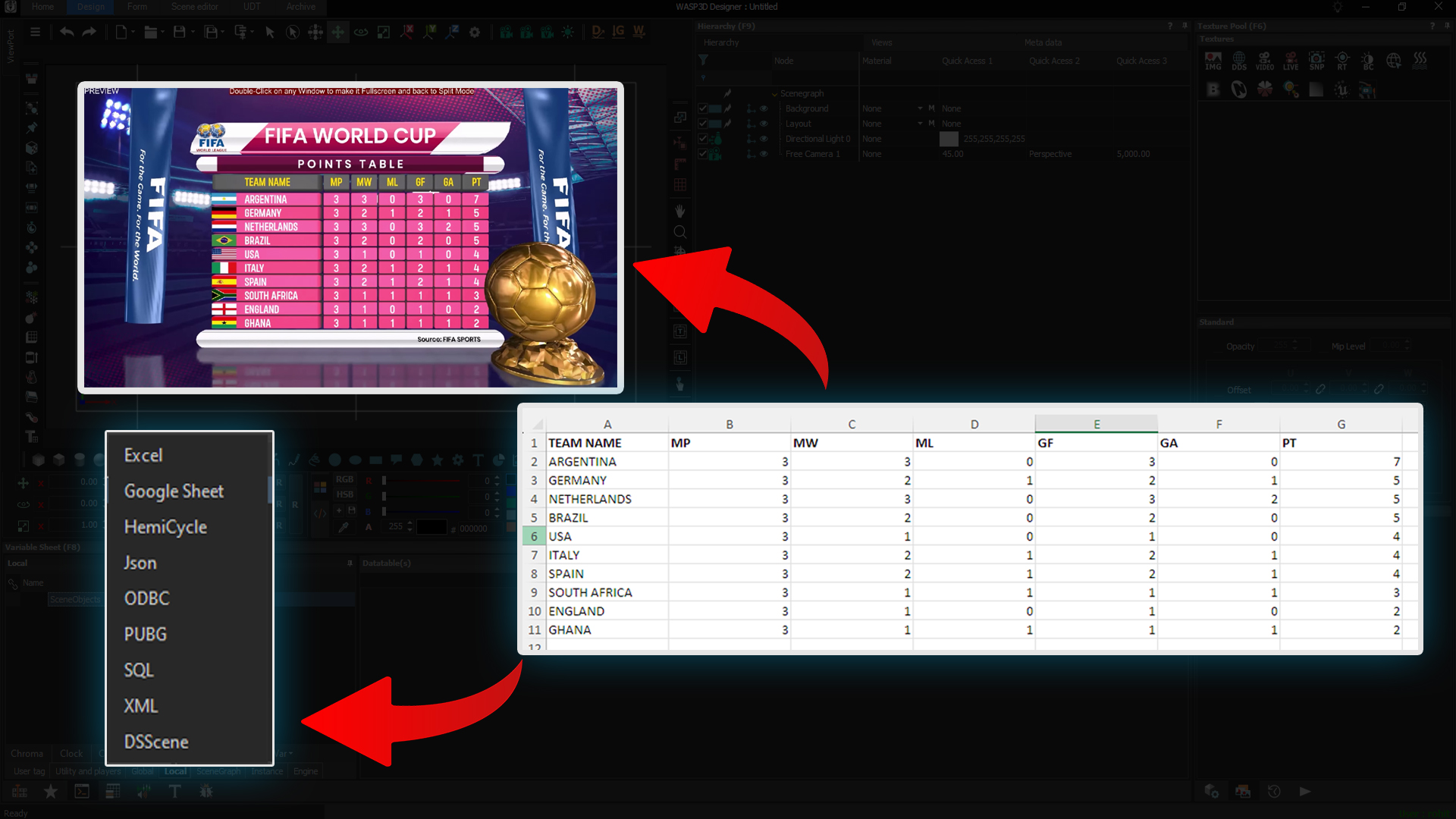
Data-Driven Graphics Without Coding
Live sports graphics rely heavily on fast data updates — player names, scores, timers, tickers, and headline changes.
In HTML-based workflows, these updates are typically handled through JavaScript or external data connections. This offers flexibility for technically inclined teams.
In contrast, WASP3D Xpress manages dynamic content within the graphics engine.
Every object, texture, and material is:
- Parameter-controlled
- Form-driven
- Designed for operator use
Operators can update:
- Names and scores
- Timers and counters
- Tickers and headlines
through structured control panels instead of modifying scripts.
HTML systems rely on web technologies for updates, while engine-based systems integrate data control directly into the production environment.
For technically inclined teams, script-based control may work well. For productions where operators need quick, safe updates without interacting with code, an engine-based approach like Xpress can simplify on-air execution.
Both methods support dynamic graphics — they simply structure the process differently.
Why Stability Often Matters More Than “Free”
HTML overlays are popular partly because they are accessible and low-cost.
In live streaming, however, the true cost of any system is often measured by reliability rather than licensing.
Because HTML graphics operate inside browser engines, performance depends on system resources, browser behavior, and workflow discipline. In controlled setups, this works smoothly.
During longer or more complex productions, inconsistencies may occur — such as refresh interruptions or rendering differences across systems.
This reflects the architectural purpose of browsers, which were designed for interactive content rather than continuous broadcast playout.
WASP3D Xpress operates as a dedicated graphics engine with native object handling, texture management, and material rendering built into the system. It renders graphics within a controlled production environment rather than through a browser layer.
Importantly, Xpress is available without licensing cost, making the comparison less about price and more about workflow design.
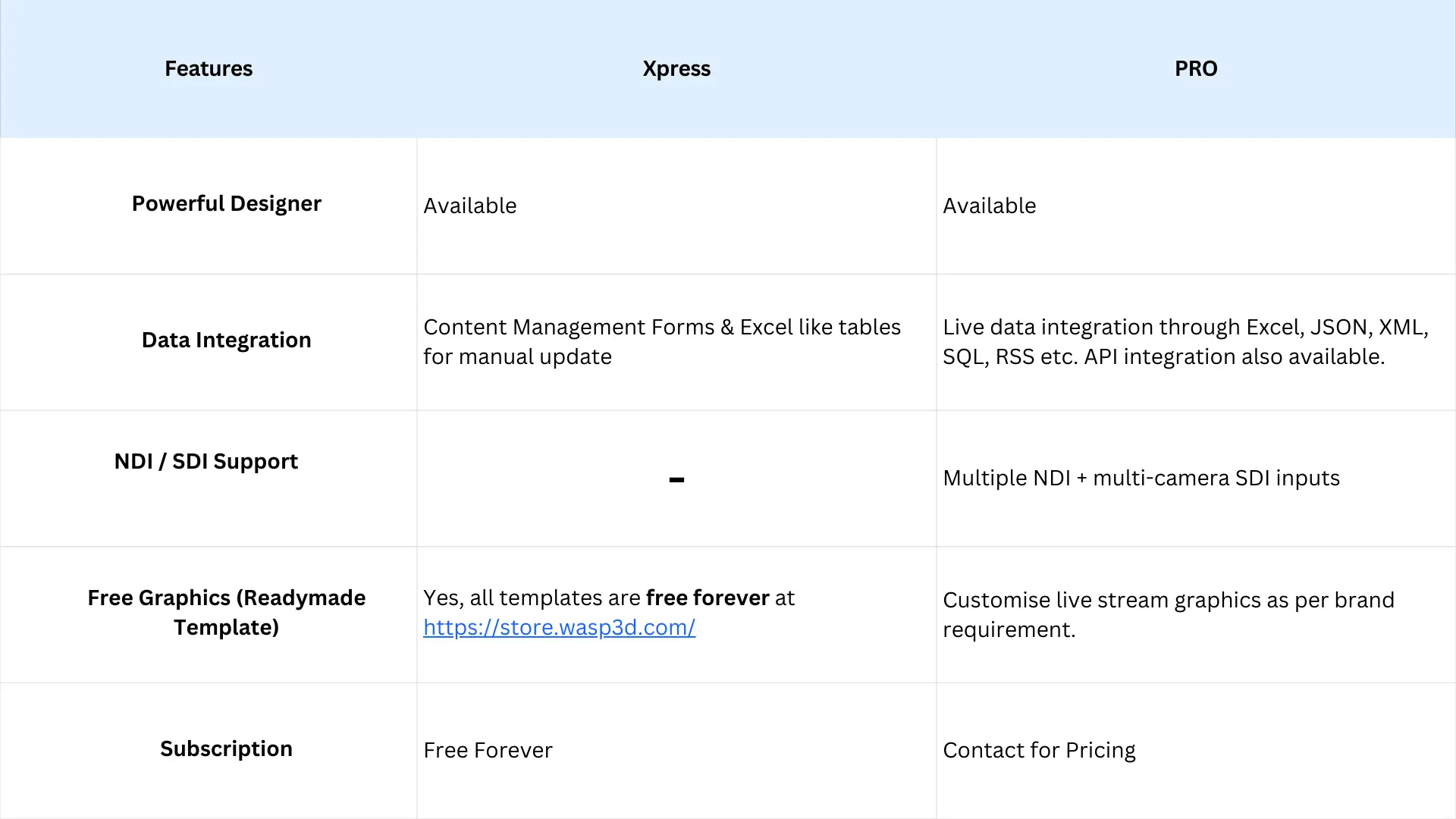
Also WASP3D PRO is an advanced version in which you can get some extra features for your streaming requirements.
Below you can see the difference in both as per your requirements:
Conclusion
HTML overlays remain widely used and practical — particularly for web-first and technically managed setups.
A broadcast-oriented engine such as WASP3D Xpress becomes increasingly relevant when production involves:
- Frequent live data updates
- Repeated or scheduled shows
- Multiple operators
- Higher expectations for output consistency
At that stage, the discussion shifts from cost to operational predictability.
The decision is not about which technology is universally better, but about which architecture aligns with the scale and reliability requirements of the production.
FAQs
1. What is the difference between HTML sports graphics and a broadcast graphics engine?HTML sports graphics are built using web technologies like CSS, SVG, and JavaScript and run inside a browser. A broadcast graphics engine, on the other hand, renders graphics inside a dedicated real-time rendering environment.
The key difference lies in architecture — browsers are designed for webpages, while broadcast engines are built for continuous, on-air reliability and predictable performance during live sports production.
2. Are HTML overlays good enough for live sports streaming?
However, as live sports production becomes more complex — with frequent score updates, multiple graphics layers, and longer runtimes — maintaining stability and consistency can become more challenging compared to a dedicated broadcast graphics engine.
This reduces dependency on browser behavior, refresh cycles, and system-level inconsistencies — which can be critical in high-pressure live sports environments where graphics must update instantly and reliably.
4. How do data-driven graphics work in a broadcast graphics engine?
Instead of modifying scripts, operators can update graphics safely in real time. This makes live data-driven graphics more manageable during fast-paced sports broadcasts.
The decision isn’t about which technology is “better,” but about choosing the right workflow architecture based on the scale, reliability, and repeatability your live sports production requires.