Finding the best live streaming software is essential for creators, broadcasters, businesses, and production teams that want to deliver professional-quality broadcasts. Live streaming has evolved from a simple way to share content online into a powerful medium for sports, webinars, news, gaming, corporate events, and entertainment.
Whether you’re streaming on YouTube, Twitch, Facebook Live, LinkedIn, or hosting a virtual event, professional productions rely on a combination of video switching, live graphics, remote guest integration, recording, and multi-platform streaming. Modern live productions bring all these elements together to deliver an engaging and seamless viewing experience.
Choosing the best live streaming software plays a major role in achieving this level of production quality. The right software not only helps you broadcast your content but also streamlines your workflow, improves audience engagement, and enables your production to scale as your needs grow.
In this guide, you’ll learn what live streaming software is, why it matters for professional content creation, and the essential features you should look for before choosing a solution.

What Is Live Streaming Software?
Live streaming software is an application that captures video and audio, processes the content in real time, and broadcasts it to one or more online streaming platforms. It acts as the bridge between your production setup and your audience, allowing viewers to watch your content live from anywhere in the world.
However, there is an important distinction between basic live streaming software and complete live production software.
Basic streaming applications are primarily designed to encode and transmit video to streaming platforms. While they are suitable for simple broadcasts, they often offer limited production capabilities.
Professional production software goes much further by combining multiple broadcasting tools into a single environment. In addition to streaming, it allows users to:
- Switch between multiple camera feeds
- Add professional lower thirds and live graphics
- Manage multiple video sources
- Integrate remote guests
- Play pre-recorded videos during broadcasts
- Record productions while streaming
- Stream simultaneously to multiple platforms
- Automate production workflows
For broadcasters, production houses, sports organizations, educational institutions, and enterprise users, these capabilities help deliver broadcasts that look polished and operate more efficiently.
As live productions become increasingly sophisticated, many organizations are moving beyond standalone streaming applications and adopting integrated production environments that combine switching, graphics, media playback, and streaming into one workflow.
Why Choosing the Best Live Streaming Software Matters
Not all streaming solutions are designed for professional production. Selecting the best live streaming software can significantly impact both the quality of your broadcast and the efficiency of your production team.
Better Production Quality
Professional streaming software allows you to manage multiple cameras, create smooth transitions, display branded graphics, and deliver high-quality video with minimal latency. These features create a polished viewing experience that reflects positively on your brand.
Increased Audience Engagement
Viewers are more likely to stay engaged when broadcasts include dynamic elements such as lower thirds, scoreboards, animated overlays, countdown timers, and other live graphics. These visual enhancements make streams more informative and visually appealing while reinforcing your branding.
Reliable Streaming Performance
Dropped frames, unstable connections, or poor synchronization between video and audio can negatively affect the viewing experience. The best live streaming software provides reliable encoding, stable streaming, and support for professional streaming protocols, helping ensure smooth broadcasts even during demanding productions.
Multi-Platform Streaming
Today’s audiences consume content across multiple platforms. Rather than streaming to a single destination, many creators broadcast simultaneously to YouTube, Facebook Live, Twitch, LinkedIn, and other services. Multi-platform streaming helps maximize reach without requiring separate production workflows.
Scalability for Growing Productions
A simple streaming setup may be sufficient when you’re starting out, but production requirements often grow over time. As you add more cameras, remote guests, graphics, and media sources, you’ll need software that can scale alongside your production without requiring a complete workflow overhaul.
Stronger Branding
Consistent branding is essential for professional broadcasts. Modern broadcast graphics software enables organizations to display logos, lower thirds, sponsor graphics, tickers, scoreboards, and other branded assets throughout a live production. These elements create a more professional appearance while strengthening brand recognition.
Improved Workflow Efficiency
Managing separate applications for switching, graphics, recording, and streaming can increase production complexity. Integrated workflows reduce the number of manual tasks, simplify operations, and help production teams work more efficiently during live events.
Essential Features to Look for in the Best Live Streaming Software
When comparing different solutions, it’s important to evaluate more than just streaming capabilities. The best live streaming software should support the complete production process and provide tools that simplify both setup and operation.
Multi-camera Production
Professional broadcasts often involve multiple camera angles to create a more engaging viewing experience. Look for software that can switch seamlessly between several video inputs while maintaining broadcast-quality output.
Live Switching
Live switching enables operators to transition smoothly between cameras, presentations, videos, and remote guests in real time. Fast and responsive switching is especially important during sports broadcasts, live events, webinars, and interviews.
NDI and SDI Support
Professional production environments frequently rely on technologies such as NDI (Network Device Interface) and SDI (Serial Digital Interface) to transport high-quality video between devices.
Support for these standards allows broadcasters to build flexible production workflows while integrating cameras, graphics systems, replay servers, and other broadcast equipment.
Graphics and Lower Thirds
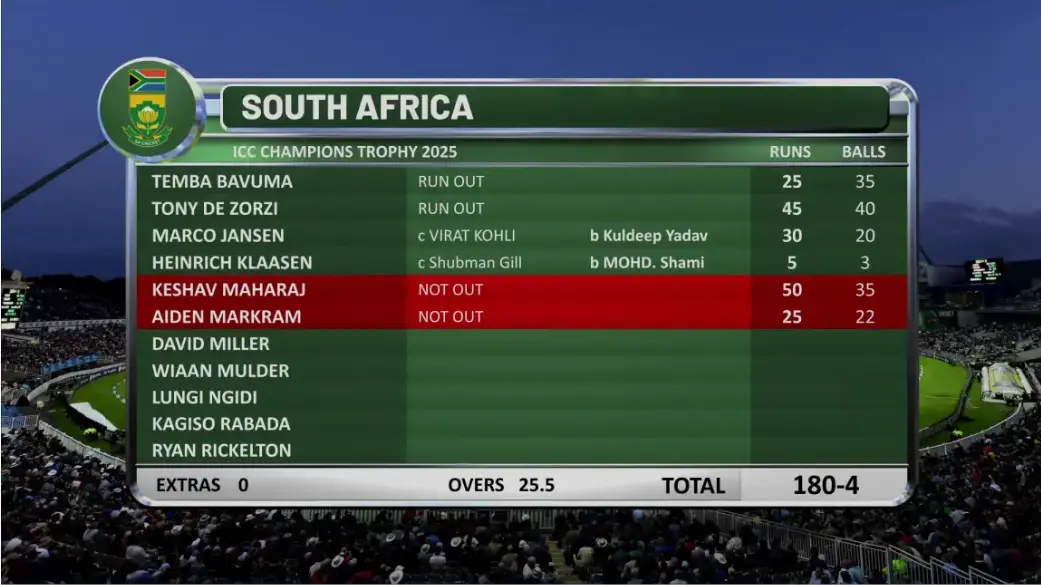
Professional broadcasts are rarely complete without visual enhancements. Integrated live broadcast graphics software allows producers to display lower thirds, titles, scoreboards, social media feeds, sponsor logos, animated tickers, and other live graphics that improve viewer engagement.
Remote Guest Integration
Remote interviews, guest appearances, and collaborative productions have become increasingly common. The best live streaming software should support the easy integration of remote contributors while maintaining stable video and audio quality throughout the broadcast.
Recording While Streaming
Recording a broadcast while simultaneously streaming provides valuable flexibility. Recorded content can be edited into highlight videos, repurposed for social media, archived for future reference, or made available for on-demand viewing after the live event.
Multi-Platform Streaming
Rather than limiting your audience to a single platform, professional streaming software should enable simultaneous broadcasting to multiple destinations. This allows creators and organizations to reach viewers wherever they prefer to watch while managing only one production workflow.
Choosing the best live streaming software is more than selecting a platform that can broadcast video. It’s about investing in a solution that supports professional production workflows, integrates essential tools, and helps you deliver engaging, high-quality content consistently.
In the next section, we’ll explore the different categories of software that work together to create a professional live production workflow and why relying on multiple specialized tools often leads to better broadcast results.
See Professional Live Production in Action
Reading about live production features is one thing, but seeing them in action provides a much better understanding of how they work together. Watch the video below to explore how professional live production software combines multi-camera switching, live graphics, video playback, dynamic layouts, and multi-platform streaming to simplify modern broadcasts.
Full Video:
What Tools and Software Are Recommended for Live Streaming and Content Production?
Choosing the best live streaming software depends on the type of content you create, the complexity of your productions, and the features you require. While some software focuses solely on streaming, others provide a complete production environment with video switching, live graphics, media playback, and multi-platform streaming. Below are some of the most popular solutions used by creators and broadcasters today.
Fluid DVE
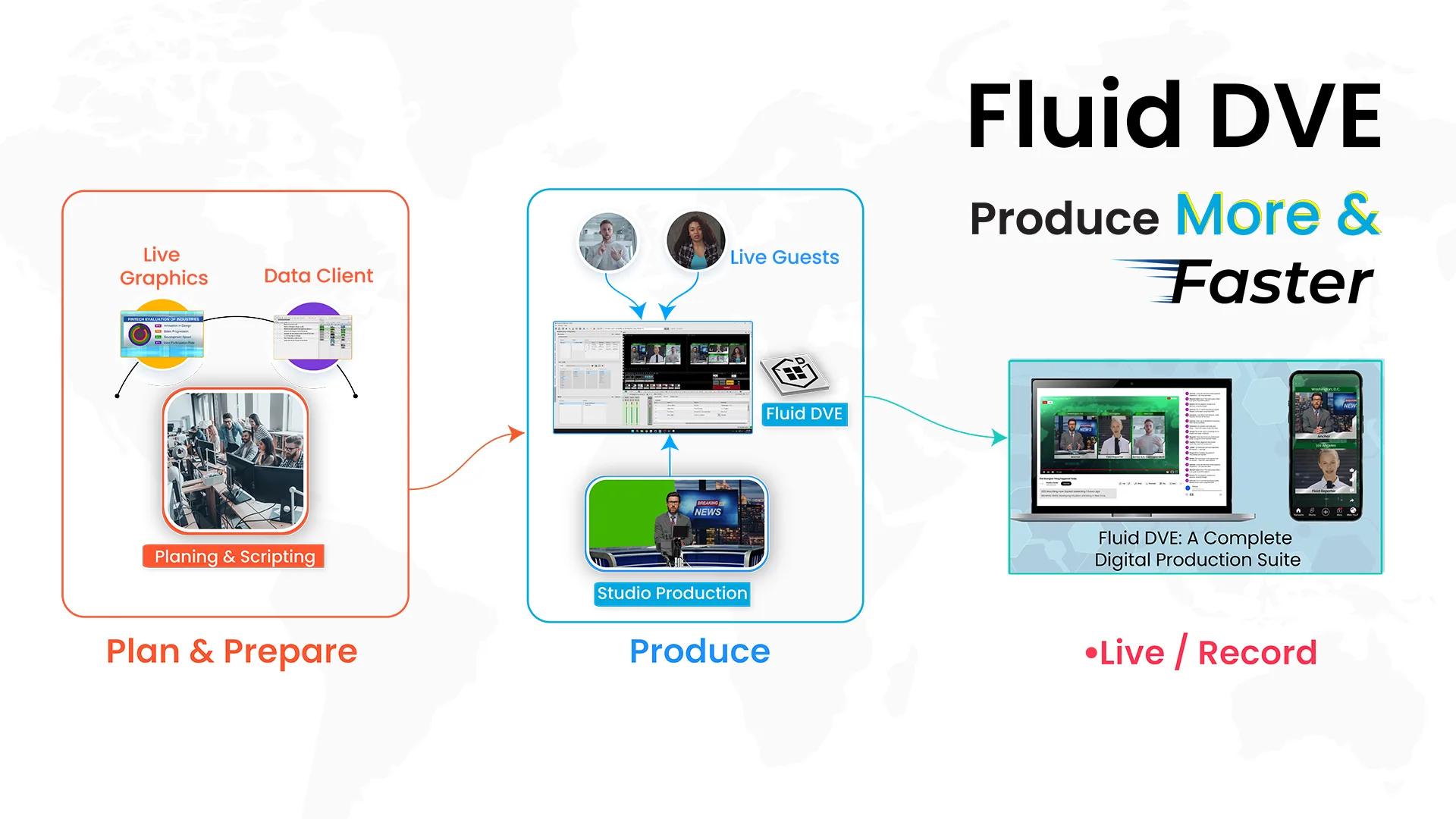
If you’re looking for an all-in-one solution for professional live production, Fluid DVE is designed to handle much more than just streaming. It combines live video switching, multi-window layouts, video playback, live graphics, dynamic transitions, and streaming outputs within a single application. Unlike workflows that require multiple software tools, Fluid DVE allows production teams to manage cameras, graphics, media assets, and streaming destinations from one centralized interface.
The software supports professional technologies such as NDI, SDI, SRT, and RTMP, making it suitable for sports broadcasts, news productions, corporate events, webinars, educational streams, and entertainment shows. Built-in support for live broadcast graphics software enables operators to add lower thirds, logos, scoreboards, tickers, and other branding elements without relying on separate graphics applications. For organizations looking to simplify complex production workflows while maintaining broadcast-quality output, Fluid DVE offers an integrated solution that scales from small productions to large live events.

OBS Studio
OBS Studio is one of the most widely used open-source live streaming software solutions, especially among beginners and independent creators. It offers scene switching, basic audio mixing, recording, and streaming to platforms like YouTube and Twitch. Its flexibility comes from an extensive plugin ecosystem, allowing users to extend functionality over time.
However, many advanced production features including professional graphics, automation, and broadcast-level workflows often require additional plugins or third-party software, making the overall setup more complex as production needs grow.
vMix
vMix is a popular choice among professional broadcasters and production companies. It provides multi-camera switching, replay, virtual sets, remote guest integration, recording, and streaming within a single platform. It also supports NDI, SRT, and various professional video inputs, making it suitable for larger productions.
While vMix offers a comprehensive production environment, organizations that require tightly integrated live graphics, flexible multi-window layouts, and simplified workflow management may evaluate alternative integrated production platforms based on their specific requirements.
Wirecast
Wirecast is another established live production solution designed for webinars, corporate events, online broadcasts, and professional streaming. It supports multiple camera inputs, screen sharing, recording, remote guests, and streaming to several online platforms. Its user-friendly interface makes it a practical choice for teams that need reliable production capabilities without extensive technical configuration.
Like many traditional production tools, users may still integrate additional applications for specialized graphics, automation, or advanced broadcast workflows depending on the complexity of their productions.
No single software is the perfect fit for every creator or broadcaster. Beginners may prioritize simplicity, while professional teams often need advanced switching, live graphics, automation, and flexible input support. For organizations managing complex productions, choosing an integrated platform like Fluid DVE can reduce the need for multiple applications, streamline operations, and deliver a more efficient live production workflow.
Broadcast Management Tools Used with the Best Live Streaming Software
Managing a live broadcast involves much more than switching between cameras. Behind every successful production is a well-organized workflow that helps operators manage media, automate repetitive tasks, and maintain consistency throughout the event.
Effective broadcast management tools reduce complexity while allowing production teams to focus on delivering a smooth viewing experience.
Production Management
Professional productions follow detailed rundowns, schedules, and production timelines. Production management tools help coordinate every stage of the broadcast, ensuring presenters, operators, graphics, and media assets are ready at the right moment.
Playlist Management
Media playlists organize videos, advertisements, promotional clips, countdown timers, and other assets into the correct playback sequence. This reduces manual intervention during live events and minimizes the risk of missed cues.
Source Management
A live production may include cameras, laptops, graphics systems, remote guests, media servers, and external video feeds. Source management helps operators monitor and organize these inputs efficiently.
Scene Management
Different production scenarios require different layouts. Scene management allows broadcasters to create predefined scenes for interviews, presentations, split-screen discussions, sports coverage, and picture-in-picture layouts, making transitions faster during live broadcasts.
Media Organization
Keeping graphics, videos, logos, animations, and audio files properly organized ensures operators can access the correct content instantly, even during fast-paced productions.
Live Graphics Management
Managing live graphics efficiently is essential for maintaining a professional broadcast. Production teams need quick access to lower thirds, scoreboards, sponsor logos, animated tickers, and branding elements throughout the event.
Streaming Destination Management
Professional productions often stream to multiple platforms simultaneously. Managing these destinations from one interface simplifies configuration while allowing operators to monitor streaming performance across every platform.
Team Collaboration
Live productions involve producers, technical directors, graphics operators, audio engineers, and camera operators working together. Collaborative workflows improve communication and reduce operational errors during complex broadcasts.
Automation
Automation helps reduce repetitive manual tasks by triggering graphics, switching scenes, launching media playback, or starting streams based on predefined actions. This improves consistency while allowing operators to focus on more critical production tasks.
Integrated production environments bring these management capabilities together, reducing operator workload and making complex broadcasts easier to manage.
How Can I Integrate Various Tools with the Best Live Streaming Software?
Professional live productions often combine several hardware devices and software applications into a single workflow. The challenge is ensuring these components communicate efficiently without introducing delays or operational complexity.
A typical production workflow looks like this:
Camera
↓
Switcher
↓
Graphics
↓
Audio
↓
Remote Guest
↓
Recording
↓
Streaming Platform
Each stage contributes to the final broadcast.
Cameras capture the live video, while the video switcher combines multiple camera feeds and media sources into a single production. Graphics software then adds lower thirds, scoreboards, logos, and other visual elements to enhance the broadcast.
Next, audio software mixes microphones, commentary, music, and remote guest audio to produce balanced sound. Remote contributors are integrated into the production, the final program is recorded for future use, and the completed broadcast is streamed to one or more online platforms.
To make these systems work together, professional productions commonly rely on technologies such as:
- NDI for transmitting high-quality video over IP networks.
- SDI for reliable broadcast-grade video connectivity.
- SRT for secure, low-latency video transport across the internet.
- RTMP for delivering live streams to online platforms.
As productions become more sophisticated, many broadcasters prefer integrated production environments instead of managing several separate applications. Solutions such as Fluid DVE bring together live switching, multi-window layouts, live graphics, video playback, dynamic transitions, multiple input sources, and streaming outputs within a single interface.
Watch How Fluid DVE Simplifies Multi-Window Live Productions
One of the biggest challenges in professional live production is managing multiple video sources while maintaining a clean and engaging layout. The following demonstration shows how Fluid DVE handles software-based multi-window switching, making it easier to create professional interviews, panel discussions, webinars, podcasts, and live events from a single production environment.
Watch This Video:
By reducing the number of disconnected tools, integrated solutions simplify production workflows, improve operational efficiency, and help teams manage complex live events more confidently.
How Can I Improve My Streaming Setup for Twitch?
Improving your streaming setup doesn’t necessarily require rebuilding your entire workflow overnight. Instead, focus on upgrading the areas that have the greatest impact on the viewer experience.
Start with a high-quality camera and proper lighting to produce a sharper, more professional image. Pair this with a reliable microphone to ensure your voice remains clear throughout the stream. A stable internet connection is equally important, helping prevent dropped frames and interruptions during live broadcasts.
As your production evolves, consider adding multiple camera angles to create a more dynamic viewing experience. Professional overlays, lower thirds, branded graphics, and live graphics can also make your stream look more polished while reinforcing your personal brand. Many Twitch creators begin with basic live streaming software, but as their channels grow, they often transition to integrated production solutions that combine switching, graphics, media playback, and multi-source management. This allows them to manage increasingly complex productions while delivering a more engaging experience for their audience.
Best Live Streaming Software Comparison
Choosing the best live streaming software depends on your production requirements, budget, and the level of control you need during a broadcast. While some solutions are designed for beginners, others provide advanced production capabilities for broadcasters, production houses, sports organizations, and enterprises.
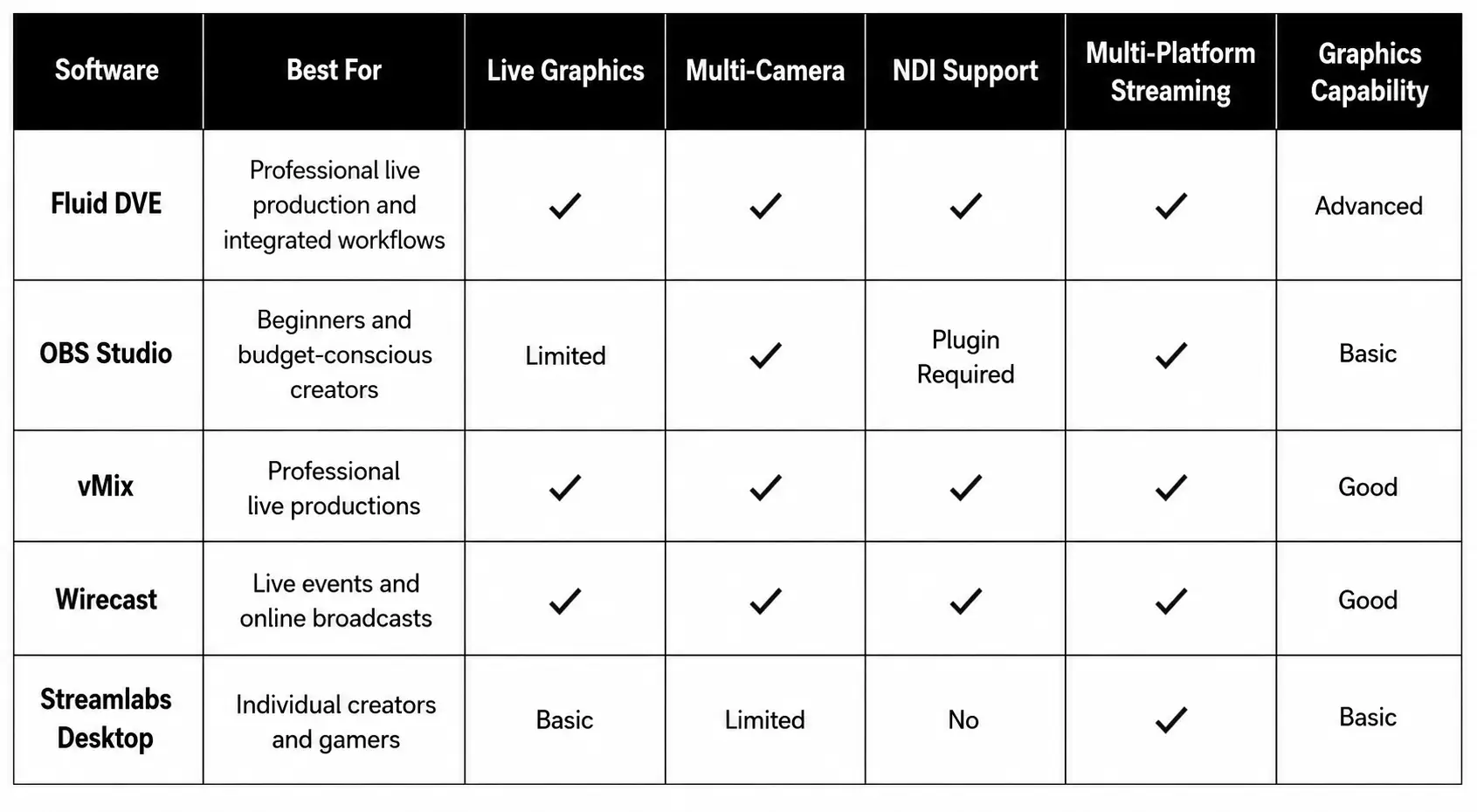
Which Software Is Right for You?
- For beginners: A simple live streaming software solution may be enough to start creating content.
- For growing creators: Look for software that supports multiple cameras, overlays, remote guests, and simultaneous streaming.
- For professional broadcasters and production teams: Choose an integrated solution that combines switching, live broadcast graphics software, media playback, recording, and streaming into a single workflow.
As production requirements become more demanding, integrated platforms can help reduce operational complexity while improving efficiency and consistency.
Conclusion
The demand for high-quality live content continues to grow across industries, from gaming and education to sports, news, corporate events, and entertainment. As audience expectations increase, simply streaming video is no longer enough. Modern productions require a complete workflow that combines switching, graphics, recording, automation, remote collaboration, and reliable streaming.
Choosing the best live streaming software is about selecting a solution that supports both your current needs and future growth. Features such as multi-camera production, live graphics, broadcast graphics software, NDI support, remote guest integration, and multi-platform streaming have become essential for delivering professional-quality broadcasts.
While many creators begin with standalone live streaming software, growing productions often benefit from integrated platforms that bring multiple production functions together. Solutions like Fluid DVE exemplify this approach by combining live switching, multi-window layouts, video playback, streaming outputs, and graphics into a unified production environment. By reducing the need to switch between multiple applications, integrated workflows can improve operational efficiency and simplify live event management.
Ultimately, the best choice depends on your production goals, technical requirements, and the level of control you need during a broadcast. By investing in software that offers flexibility, scalability, and professional production capabilities, you’ll be better equipped to create engaging live experiences that stand out in an increasingly competitive streaming landscape.