Introduction: Live Stream Best Practices: 9 Common Mistakes and How to Fix Them
Live stream best practices are essential for creating professional broadcasts that keep viewers engaged. Live streaming has become one of the most widely used ways to share content online. Today, creators and organizations use live stream production for many different purposes, including sports matches, esports tournaments, news streams, podcasts, corporate events, and online shows on platforms like YouTube Live and Facebook Live. Download FREE livestream graphics software/.
However, even though the technology for streaming has improved significantly, many live streams still look unprofessional. Surprisingly, this usually does not happen because of the streaming platform itself. Instead, it often happens due to small mistakes in the way the live stream production workflow is handled.
For example, many creators struggle with managing graphics overlays, updating on-screen information, handling multiple video sources, or designing clean layouts in their live streaming production setup. As a result, viewers may see missing graphics, delayed score updates, cluttered screens, or poorly organized visuals.
Even when the camera’s quality is good, these small issues can reduce the overall viewing experience in both YouTube Live streaming and Facebook Live streaming environments.
The good news is that most of these problems are easy to avoid. By understanding some of the most common live stream production mistakes, creators can improve their live streaming production workflow and deliver streams that look more professional and engaging. Following live stream best practices can help creators avoid common production mistakes and deliver a more professional viewing experience.
In this guide, we will explore some common live stream production setup mistakes and practical ways to fix them.
Mistake 1: Live Stream Best Practices for On-Screen Graphics
Problem
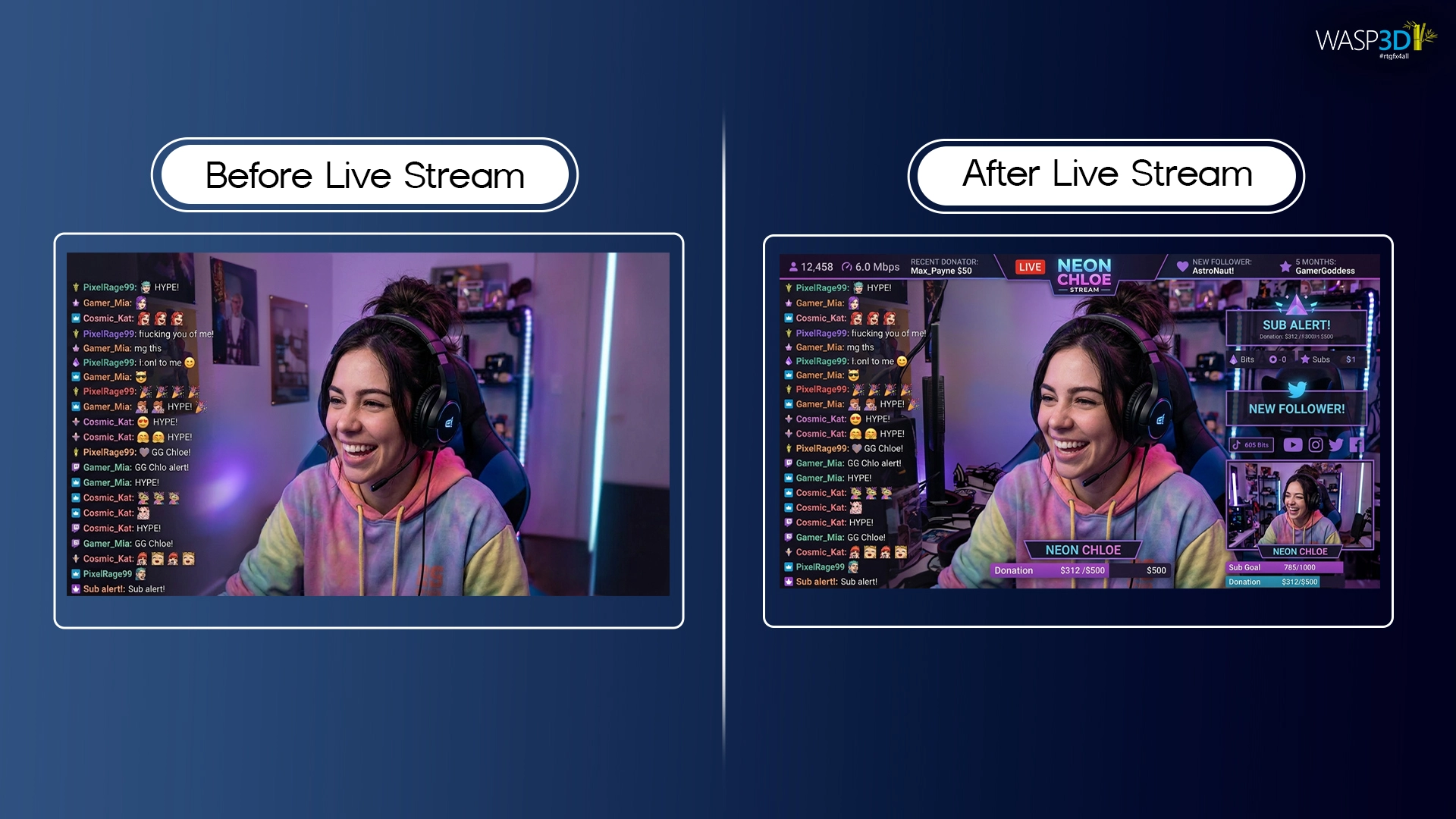
One of the most common mistakes in live stream production is streaming with only raw camera footage and no graphics elements. Many beginners simply start streaming without adding visual information to the screen in their live streaming production setup.
For example, you may often see:
• sports streams without score overlays
• podcasts without speaker name titles
• event streams without branding graphics
When a stream does not include graphics, it can look basic and unstructured. More importantly, viewers may struggle to understand what they are watching, especially if they join the stream midway on platforms like Facebook Live or YouTube Live.
Why It Matters
One of the most important live stream best practices is using on-screen graphics to provide viewers with context and information. Graphics play an important role in delivering information clearly during a live stream production. Elements such as lower thirds, titles, and scoreboards help viewers quickly understand key details.
How to Fix It
To improve the viewer experience, creators should include simple but informative graphics elements in their live streaming production workflow. Preparing graphics in advance is among the most effective live stream best practices for reducing on-air mistakes.
Mistake 2: Live Stream Best Practices for Graphics Management
Problem
Another common live streaming production mistake is editing graphics while the stream is already live.
This usually happens when graphics are not prepared beforehand. As a result, operators try to update titles or names during the stream itself.
Unfortunately, this often leads to issues such as:
- incorrect names appearing on screen
- spelling mistakes
- delayed graphics display
- inconsistent branding
These problems can quickly make the stream look unorganized.
Why It Matters
Live streaming requires quick decision-making. Therefore, if operators need to redesign or edit graphics during the stream, it slows down the production process and increases the chances of errors.
How to Fix It
The best solution is to prepare graphics before the live stream begins. Production teams should create templates and enter the expected content in advance.
Tools like Wasp3D Xpress simplify this process by offering template-based graphics and content editing forms. Instead of opening a complex design application, operators can simply update text fields such as names, titles, or locations.
In addition, playlist management features allow operators to organize graphics in the correct order. As a result, graphics can be triggered quickly and smoothly during the live stream. This usually happens when graphics are not prepared beforehand in a live stream production environment, especially during fast-paced YouTube Live streaming sessions. Organized graphics management is a key part of modern live stream best practices.
Mistake 3: Poor Graphics Organization During Live Streams
Problem
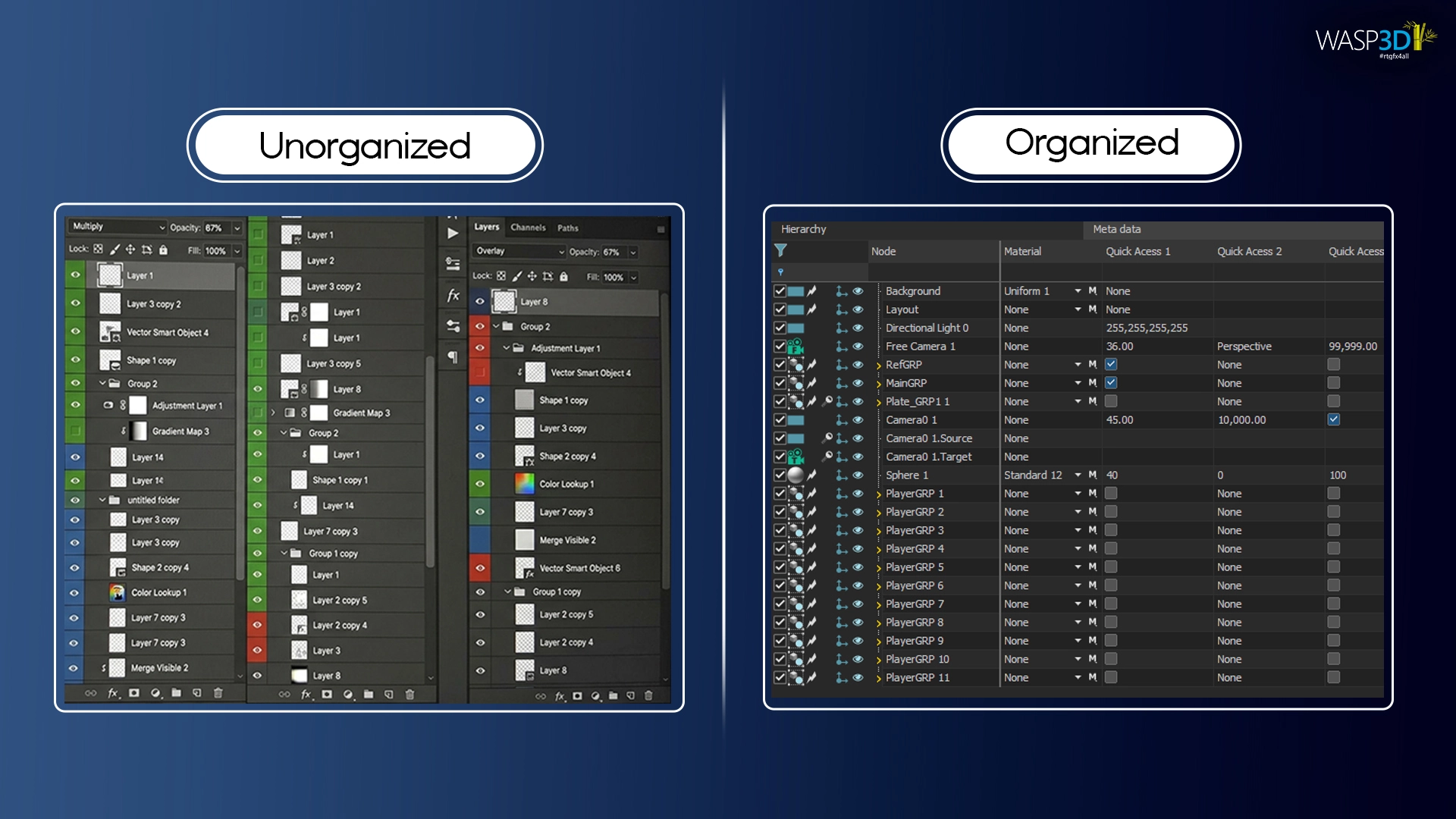
During a busy live stream, operators often need to trigger multiple graphics quickly. However, if graphics are not organized properly, finding the correct visual element becomes difficult.
For instance, operators may face situations like:
- searching for the correct lower third
- accidentally triggering the wrong sponsor banner
- displaying outdated titles
These problems typically occur when graphics files are stored randomly without a structured system.
Why It Matters
Poor organization can slow down the entire live production workflow. When operators spend time searching for graphics, the flow of the stream gets disrupted. In fast-paced events such as sports streams or esports matches, this delay can affect the viewer experience.
How to Fix It
A well-organized graphics system can solve this issue. Production teams should structure their graphics into playlists or categorized collections.
For example:
- speaker titles in one group
- sponsor graphics in another
- match information in a separate section
Tools like Wasp3D Xpress provide playlist management and structured data entry forms that help organize graphics efficiently. As a result, operators can quickly locate and trigger the correct graphics during the live stream.
Poor organization is a major issue in live stream production workflows, particularly when managing multiple scenes across Facebook Live and YouTube Live broadcasts.
Mistake 4: Live Stream Best Practices for Real-Time Data Updates
Problem
In sports and esports streams, scores and statistics often change quickly. Many creators still update this information manually during the live stream.
This approach can create several problems, including:
- delayed score updates
- incorrect statistics
- inconsistent data display
When multiple data sources are involved, manually updating graphics becomes even more difficult.
Why It Matters
Viewers expect accurate and timely information during live streams. If the scoreboard or statistics are outdated, the audience may become confused or frustrated.
Therefore, relying only on manual updates is not ideal for modern live streaming production.
How to Fix It
Today, many professional live streams use data-driven graphics that automatically update information.
For example, graphics can connect directly with data sources such as:
- JSON feeds
- XML files
- SQL databases
- APIs
This allows scores, statistics, and charts to update automatically.
Tools such as Wasp3D Pro support live data integration, which helps production teams display real-time information on screen. As a result, the graphics remain accurate while reducing manual work during the stream.
In modern live stream production, automation is key, especially for sports and esports events streamed on YouTube Live.
Mistake 5: Live Stream Best Practices for Consistent Branding
Problem
Another common live stream setup mistake is inconsistent design across graphics. Many creators design graphics quickly without following a consistent visual style.
As a result, different elements such as lower thirds, titles, and sponsor panels may use different colors, fonts, or layouts.
Why It Matters
When visual elements do not follow a consistent branding style, the stream can look unprofessional. In sports events, corporate streams, or online shows, inconsistent graphics may reduce brand recognition and make the production feel disorganized.
How to Fix It
Maintaining a consistent design system is essential for professional-looking live streams.
Production teams should define:
- a fixed color palette
- consistent fonts
- standardized layouts
Reusable graphic templates can help maintain this consistency across different events.
Platforms like Wasp3D Xpress allow creators to design branded templates that can be reused throughout the live stream. This ensures that every graphic element follows the same visual style.
Consistency is critical in professional live stream production, as it directly impacts branding across Facebook Live and YouTube Live streams.
Mistake 6: Live Stream Best Practices for Dynamic Graphics and Overlays
Problem
Some live streams rely only on static images as overlays. While these images may display basic information, they usually lack animation or real-time updates.
For example, static graphics may include:
- simple title cards
- fixed sponsor banners
- non-animated information panels
Why It Matters
Static visuals can make a stream feel less engaging. Modern audiences are used to dynamic visuals that update in real time.
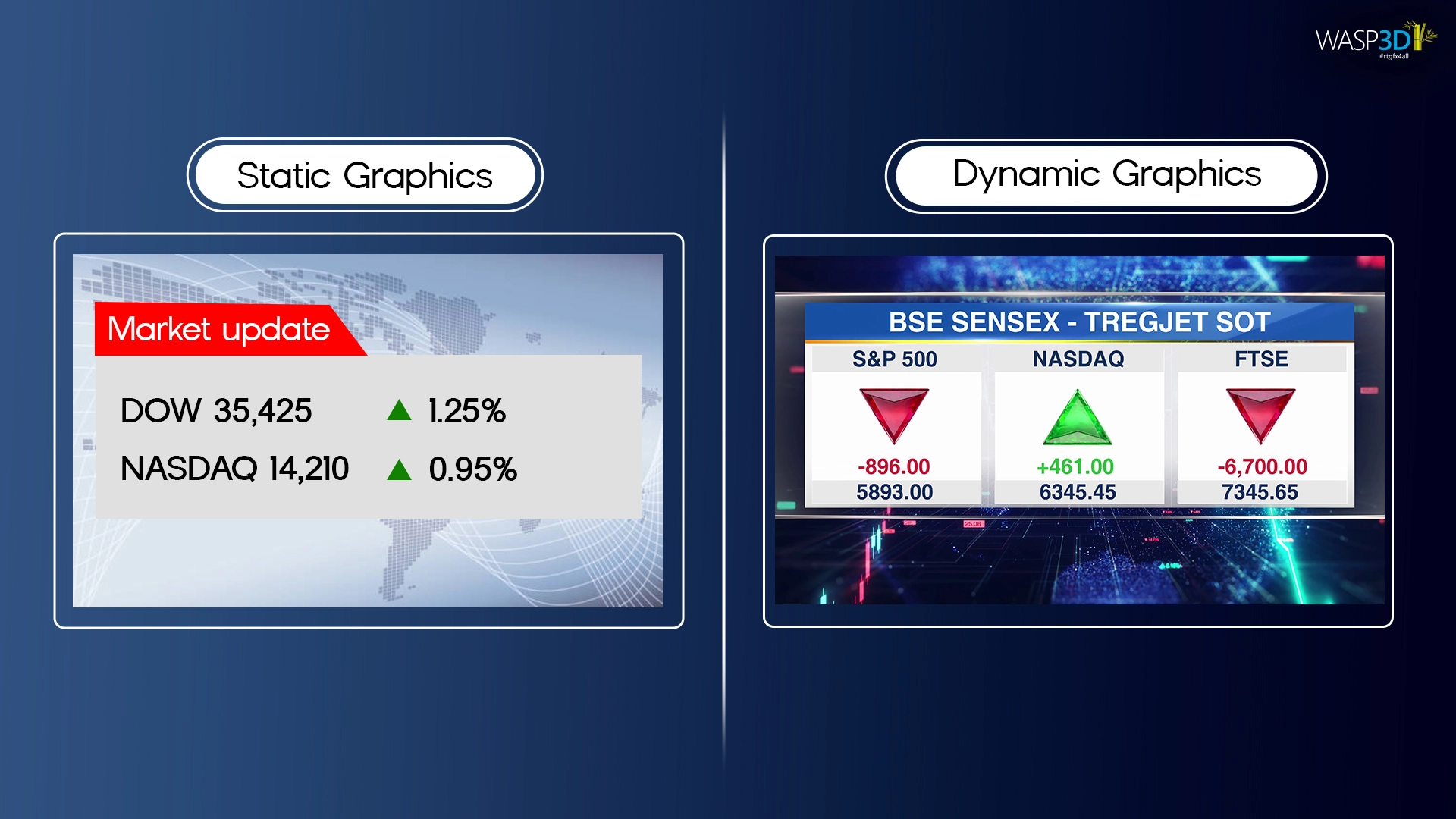
For instance, animated tickers, countdown timers, and moving graphics help keep viewers interested while delivering information clearly.
How to Fix It
Adding animated and responsive graphics can significantly improve the visual quality of a live stream.
Examples include:
- scrolling tickers
- animated lower thirds
- countdown timers
- dynamic information panels
Tools like Wasp3D Xpress support animated graphics templates that make it easier to include dynamic visuals without complex design workflows.
Dynamic visuals are now a standard expectation in high-quality live stream production workflows, especially for engaging YouTube Live audiences.
Mistake 7: Live Stream Best Practices for Testing Before Going Live
Problem
Another inefficient practice in live stream production is designing graphics from scratch for every event.
Operators may repeatedly recreate elements such as:
- lower thirds
- titles
- sponsor graphics
- scoreboards
Why It Matters
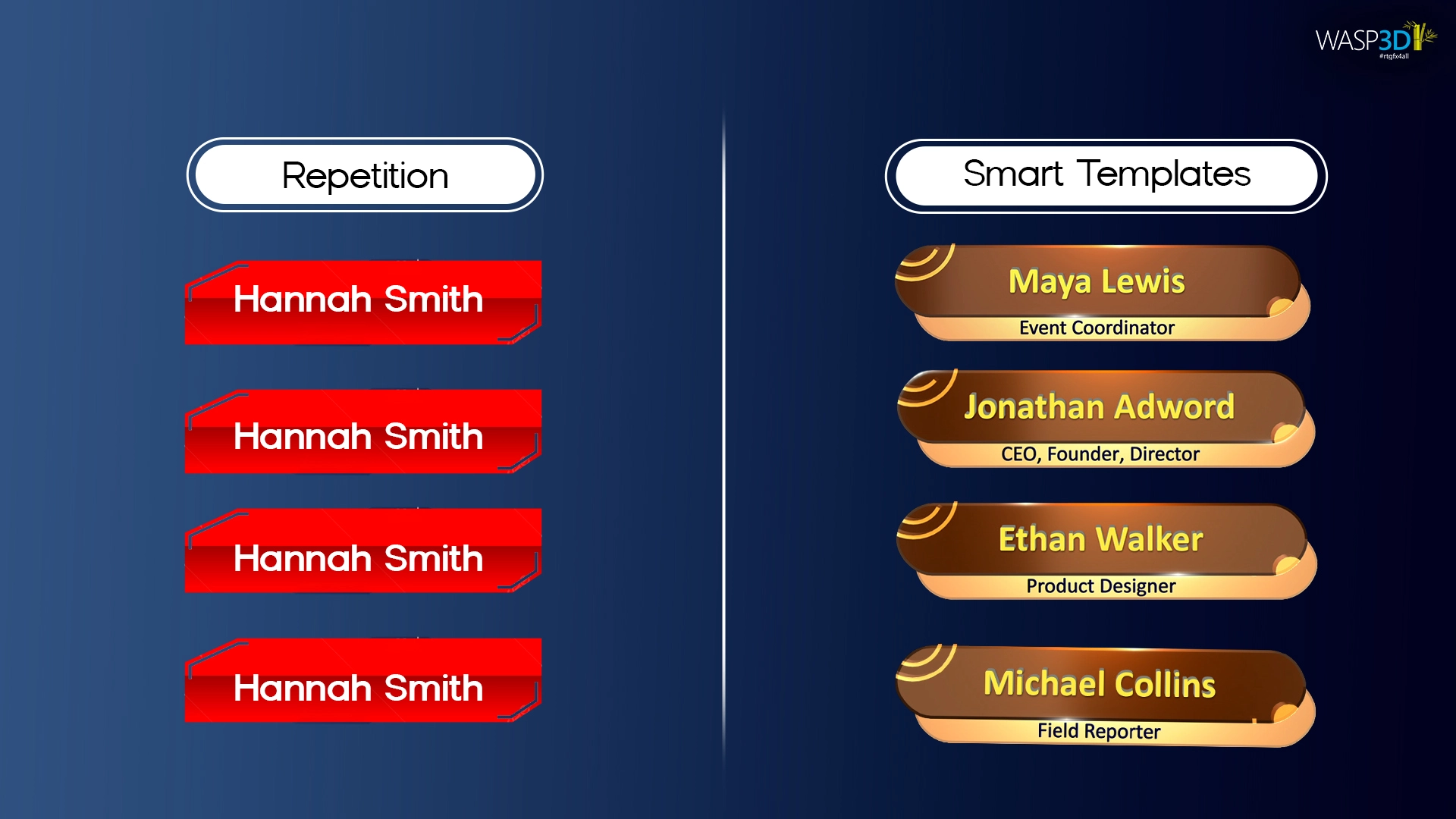
Designing graphics repeatedly slows down the workflow and increases the chances of mistakes. Additionally, when multiple operators work on different graphics, the design style may become inconsistent.
How to Fix It
A template-based approach is far more efficient. By creating reusable templates, operators only need to update the text or data fields for each new stream.
Using tools like Wasp3D Xpress allows production teams to reuse graphics designs while simply changing the content. This saves time and ensures consistent visual quality across streams.
A scalable live stream production process always relies on reusable templates rather than starting from zero.
Mistake 8: Running Separate Tools for Graphics, Switching, and Data
Problem
Many live streaming setups rely on multiple tools for different tasks. One system may handle graphics, another may manage video switching, while a separate application controls data updates.
Why It Matters
When these systems operate independently, coordination becomes difficult. Production teams may experience:
- delayed graphics triggers
- mismatched updates
- communication gaps between operators
How to Fix It
Modern live production workflows benefit from tools that can integrate with other systems.
For example, Wasp3D Pro allows graphics to connect with external applications and live data sources. This type of integration helps automate updates and simplifies coordination during the live stream.
Disconnected tools can slow down even the most advanced live stream production setup, particularly during complex Facebook Live streaming events.
Mistake 9: Not Preparing or Testing Graphics Before Going Live
Problem
Many creators prepare graphics at the last minute or load them during the stream without proper testing.
This can lead to problems such as:
- incorrect names on screen
- misaligned graphics
- animations not working correctly
- overlays covering important visuals
Why It Matters
When these issues appear during a live stream, they can affect the overall professionalism of the production.
How to Fix It
Preparation is essential for successful live streaming production.
Before starting the stream, operators should:
- preview graphics
- check text fields
- test animations
- confirm layout alignment
By organizing and testing graphics beforehand, creators can ensure a smooth and error-free live stream.
Testing is a critical step in any professional live stream production workflow, ensuring smooth performance across platforms like YouTube Live and Facebook Live.
Conclusion Why Live Stream Best Practices Matter
Creating a professional live stream requires more than just a camera and an internet connection. Successful live stream best practices depend on clear workflows, organized graphics management, and reliable tools.
By avoiding common live streaming mistakes, creators can significantly improve the quality of their streams.
For example, production teams should focus on:
- preparing graphics before the stream
- using consistent branding across visuals
- integrating real-time data where possible
- organizing graphics for quick access
When these practices are followed, live streams become easier to manage and far more engaging for viewers.
Ultimately, improving your live stream production workflow helps deliver a smoother and more professional streaming experience for your audience.
A well-optimized live stream production strategy not only improves visual quality but also enhances viewer engagement across platforms like YouTube Live and Facebook Live.