Introduction: Streaming Graphics Software: Free vs Paid
Most streamers start with free tools like OBS Studio, Stream labs, or browser overlays. For small YouTube streams, podcasts, esports match, or local sports coverage, these tools work surprisingly well.
- manual score updates
- unstable overlay workflows
- difficult multi-operator coordination
- limited automation
- graphics breaking during live events
“What graphics software should I use?”
“Is free software still enough for my workflow?”
- when free graphics software works perfectly
- where it starts becoming limiting
- when upgrading to professional broadcast graphics systems actually makes sense.
Is OBS Enough for YouTube Live Streaming?
For many creators, OBS Studio is absolutely enough for YouTube Live streaming.
OBS remains one of the most popular free streaming tools because it offers strong flexibility, scene control, multi-source support, and broad compatibility with streaming platforms. For gaming streams, podcasts, interviews, tutorials, educational content, and smaller live productions, OBS can deliver highly professional results.
Many YouTube creators successfully use OBS with, webcam layouts, overlays, transitions, alerts, lower thirds, basic live graphics However, the limitations usually appear when productions become larger or more data-driven.
For example, sports streams, live news coverage, election broadcasts, and corporate productions often require automated graphics, real-time score integration, multi-operator coordination, advanced branding workflows, and professional broadcast outputs. At that stage, OBS alone may not provide the level of automation and workflow efficiency required for consistent large-scale production.
The decision is not about whether OBS is “good” or “bad.” It depends entirely on production scale. For solo creators and growing YouTube channels, OBS may remain sufficient for years. But for broadcast-style workflows with increasing complexity, dedicated live graphics systems often become necessary to maintain speed, reliability, and operational control.
Understanding Live Graphics Software
Live graphics software enables operators to create, control, and display visual elements during a live broadcast or stream. Simply put, Live Graphics Software acts as the visual layer that makes a stream look organized, branded, and informative.
Depending on the system, graphics may be simple overlays placed on top of video, or part of a real-time rendering engine capable of handling data feeds, automation, and broadcast outputs. As streaming technology evolves, modern Live Graphics Software is increasingly designed to support faster workflows and smoother visual experiences.
Where Live Graphics Are Used
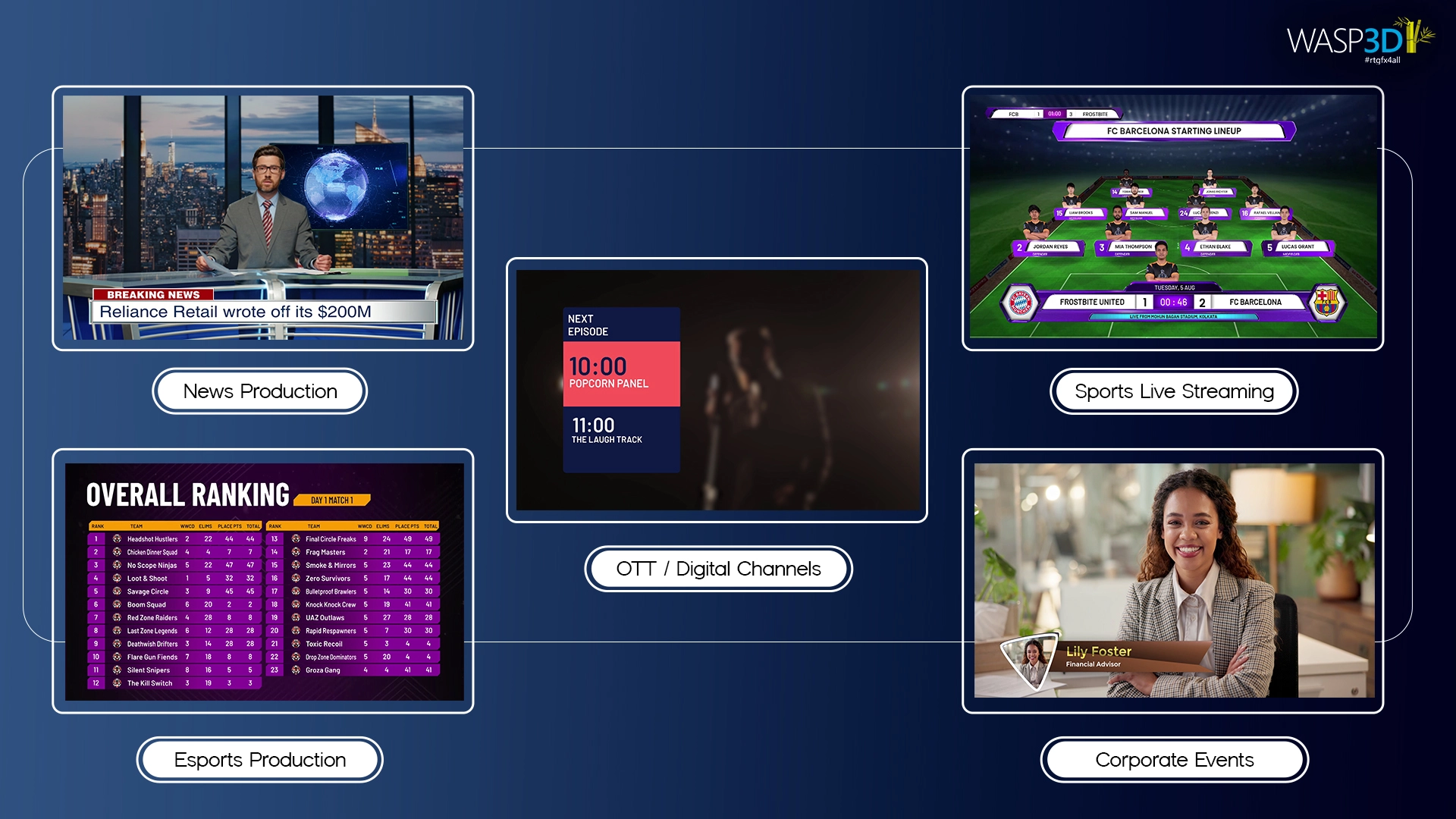
Live graphics are now standard across industries:
- Sports broadcasting – scoreboards, timers, player stats
- News production – lower thirds, tickers, breaking alerts
- Esports streaming – dynamic overlays and team panels
- Corporate events – branded presentations and sponsor visuals
- OTT and digital channels – polished broadcast-style packaging
Moreover, many independent creators using platforms like YouTube Live and Facebook Live are also adopting Live Graphics Software to improve the professional look of their streams.
The production demands in each of these environments vary significantly — and so do the software requirements.
OBS vs Professional Live Graphics Software
What OBS Handles Well
OBS Studio is excellent for:
- YouTube Live streaming
- podcasts
- gaming streams
- simple overlays
- single-operator productions
It remains one of the best free streaming tools for beginners because it is flexible, lightweight, and highly customizable.
Where OBS Starts Becoming Limiting
As productions become more advanced, creators often face challenges like:
- manual graphics updates
- unreliable plugin workflows
- difficulty handling live sports data
- multi-screen output limitations
- lack of automation
- operator overload during live events
This is where professional live graphics systems become valuable.
When Upgrading Makes Sense
Professional graphics systems become useful when:
- you stream frequently
- your production involves teams
- live scores or data are required
- branding consistency matters
- broadcast reliability becomes critical
Why Free Graphics Software Starts Breaking During Sports Streams
Free graphics software works well for small sports streams, especially when a single operator manages everything manually. However, as productions become more dynamic, sports broadcasting quickly exposes the limitations of lightweight overlay systems.
A local football match may only require a basic scoreboard and timer. But once productions begin adding sponsor animations, player statistics, instant updates, lower thirds, multiple cameras, and social media graphics, manual workflows become difficult to manage in real time.
Many creators using OBS overlays or browser-based graphics eventually face issues like:
- delayed score updates
- overlay synchronization problems
- plugin instability
- graphics layering conflicts
- operator overload during fast-paced moments
Sports productions are uniquely demanding because information changes constantly. Scores, timers, substitutions, player stats, and sponsor graphics often need simultaneous updates while the stream remains stable.
This is where professional live graphics systems become valuable. Instead of relying entirely on manual overlays, advanced graphics engines support automation, real-time data integration, and structured workflows designed specifically for live sports environments.
For occasional streaming, free graphics software may still be sufficient. But for frequent tournaments, leagues, or broadcast-style productions, scalability and reliability become increasingly important.
Why Manual Score Updates Become Difficult
Manual score updates are manageable during simple streams, but they become increasingly stressful as production complexity grows.
In smaller setups, a single operator may update scores manually using text overlays or browser graphics. While this works for casual matches or school events, it creates problems during fast-paced live productions where multiple updates happen simultaneously.
For example, during a live cricket or football stream, the operator may need to:
- update scores
- switch scenes
- trigger sponsor graphics
- monitor audio
- manage replays
- coordinate lower thirds
Under pressure, even small mistakes can become visible on-air. Delayed score changes, incorrect player names, or outdated statistics can reduce the professionalism of the broadcast.
As streaming frequency increases, manual workflows also become repetitive and inefficient. This is why many sports broadcasters eventually move toward data-driven graphics systems that connect directly with scoring software, APIs, or databases.
Professional live graphics systems reduce the need for constant manual intervention by automating score updates, statistics, timers, and graphic triggers in real time. This not only improves accuracy but also allows operators to focus more on production quality instead of repetitive tasks.
Simple Overlays vs Professional Broadcast Graphics
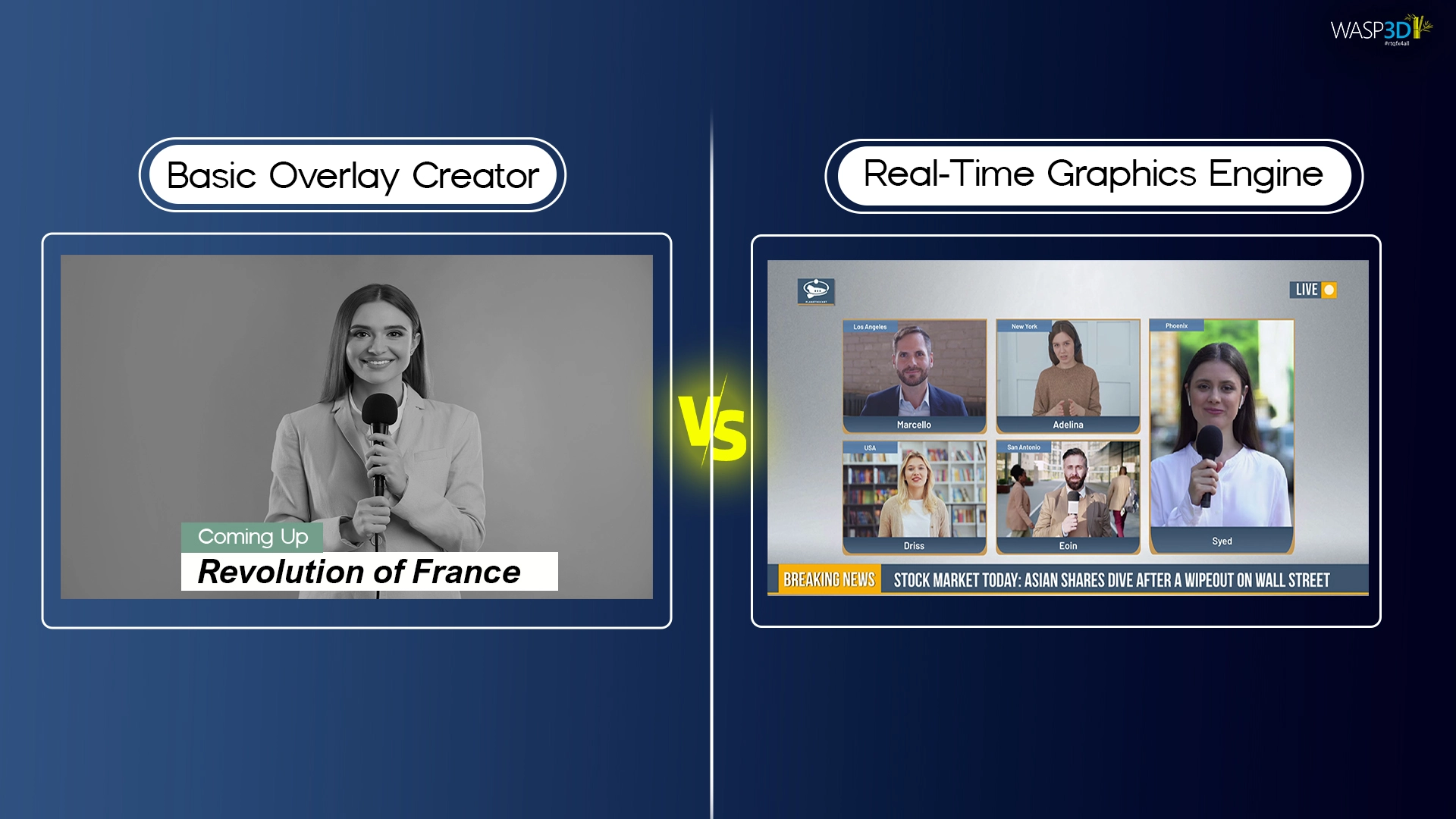
Overlay-based graphics tools are typically lightweight solutions. They render graphics as layers over a video feed, often through browser-based or software-based workflows. These systems are fast to deploy and ideal for straightforward productions.
Because of their simplicity, overlay-based Live Graphics Software tools are especially popular among beginners and small streaming teams.
Real-time graphics engines, on the other hand, are built for structured broadcast environments. They leverage GPU acceleration, support frame-accurate rendering, and integrate directly into professional video chains. These systems are designed to handle complex animations, dynamic content, and multi-output workflows.
Data-driven systems like WASP3D Pro go further. They connect to APIs, databases, or scoring systems to automatically populate graphics in real time.
As a result, these advanced Live Graphics Software systems significantly reduce manual work during live productions. This is particularly relevant for sports leagues, newsrooms, and high-frequency live events where manual updates would be inefficient.
The Live Graphics Growth Ladder
What’s the real difference between free and paid live graphics software?
The real difference lies in scalability and production depth. Free software can be surprisingly powerful, but it often depends heavily on operator skill and manual control. At the same time, many creators begin their journey with free Live Graphics Software before moving toward more advanced systems as their productions grow.
Paid systems are engineered to minimize human error, streamline data handling, and support long-duration or high-frequency productions. It’s less about “better graphics” and more about how well the system holds up when multiple layers, feeds, and data sources must function simultaneously.
As productions evolve, their graphics requirements naturally expand. This progression can be understood through a growth ladder.
Level 1: Basic Overlay Streaming
At this stage, a single operator manages the stream. Graphics are simple and manually controlled. Overlays may include basic lower thirds, logos, or score panels.
For many beginners exploring Live Graphics Software for the first time, this stage is where learning begins. A free solution is often more than adequate here.
Level 2: Structured Template-Based Production
As streams become more regular, branding becomes consistent. Templates are reused across episodes or events. There may be moderate animation and more frequent updates. Consequently, Live Graphics Software with structured template systems begins to offer clear workflow advantages. A structured template-based system provides stability and efficiency at this stage.
Level 3: Real-Time Data-Integrated Production
Here, productions begin integrating real-time data — live scores, statistics, news feeds, or social content. Manual input becomes inefficient. Therefore, Live Graphics Software that supports data integration becomes essential. Graphics systems must handle API integrations or database connections.
Level 4: Automated Broadcast Graphics Ecosystem
At the highest level, graphics operate within a larger broadcast ecosystem. Automation, triggers, multi-output workflows, and dedicated operators become standard. Systems integrate with switchers and other production hardware. Understanding which level describes your current workflow helps determine the right investment.
Who Is Free Live Graphics Software Designed For?
Free live graphics software serves an important role in the ecosystem. In many cases, free Live Graphics Software allows creators to experiment and learn production fundamentals without financial pressure.
Tool like WASP3D Xpress are not a “compromise” solution — it is simply designed for specific use cases.
Solo Streamers and Content Creators
Individual creators managing their own YouTube or streaming channel benefit from lightweight, easy-to-use tools. For example, creators streaming on YouTube Live often rely on simple Live Graphics Software overlays to display names, alerts, and branding. Manual control is manageable, and production scale is limited.
Schools and College Events
Educational institutions often stream events such as sports days, debates, or cultural programs. These productions are periodic, and simplicity is valuable. A free graphics tool fits comfortably within such setups.
Small Tournament Organizers
Local sports tournaments typically have modest technical setups. A single operator may update scores manually. For these events, a template-driven free solution works efficiently.
Social Media Live Broadcasting
Short-form and social media streams prioritize speed and accessibility. In fact, many quick streams on Facebook Live rely on lightweight live graphics software overlays for titles and branding. Quick overlay deployment and minimal technical overhead make free systems ideal for this context.
Is free streaming/graphics software good enough for professional use?
In many cases, yes — especially for digital content creators, startups, educational institutions, and niche broadcasters. With the right expertise, free tools can produce impressive results.
However, when consistency, automation, integration, and broadcast compliance become critical — particularly in traditional television environments — professional-grade systems often become necessary. The decision ultimately depends on scale, workflow complexity, and the level of production reliability required.
Are there professional free graphics engines used by real broadcasters?
Wasp3D Xpress offers a free real-time graphics engine built on broadcast-grade architecture. While positioned as accessible, it reflects workflows like professional systems, making it useful for smaller newsrooms, educational institutions, and digital-first broadcasters.
What free streaming software should beginners use vs advanced producers?
Beginners often benefit from tools like OBS because they encourage learning the fundamentals — scene composition, audio mixing, transitions, and encoding. The open ecosystem also allows experimentation without financial commitment.
Advanced producers, however, typically need deeper control over graphics pipelines, automation, and multi-layer compositions. At this stage, choosing the right Live Graphics Software becomes increasingly important for maintaining consistent production quality.
That’s where more structured systems like WASP3D Xpress become relevant, especially in environments handling multiple shows or data-driven broadcasts.
Who Is Paid Live Graphics Software Designed For?
Paid systems are structured for larger, more complex production environments. In other words, professional Live Graphics Software is designed for teams that require reliability, automation, and deeper integration.
Regional and National Broadcasters
Broadcast channels require consistent branding, high-quality rendering, and integration with professional equipment. These workflows demand robust systems.
Sports Leagues and Data-Heavy Productions
When real-time statistics, automated scoring, and sponsor integration are involved, data-driven capabilities become critical. As a result, advanced Live Graphics Software becomes essential in these environments.
Newsrooms with Real-Time Updates
Breaking news environments require fast graphic updates connected to newsroom systems. Automation and integration reduce on-air errors.
Corporate and Hybrid Event Teams
Large-scale corporate productions often involve multiple presenters, sponsor commitments, and structured branding needs.
Production Agencies Managing Multiple Clients
Agencies require scalability, template replication, and efficient multi-client workflows. Structured systems enable consistency across projects.
What paid software options exist for advanced streaming and graphics?
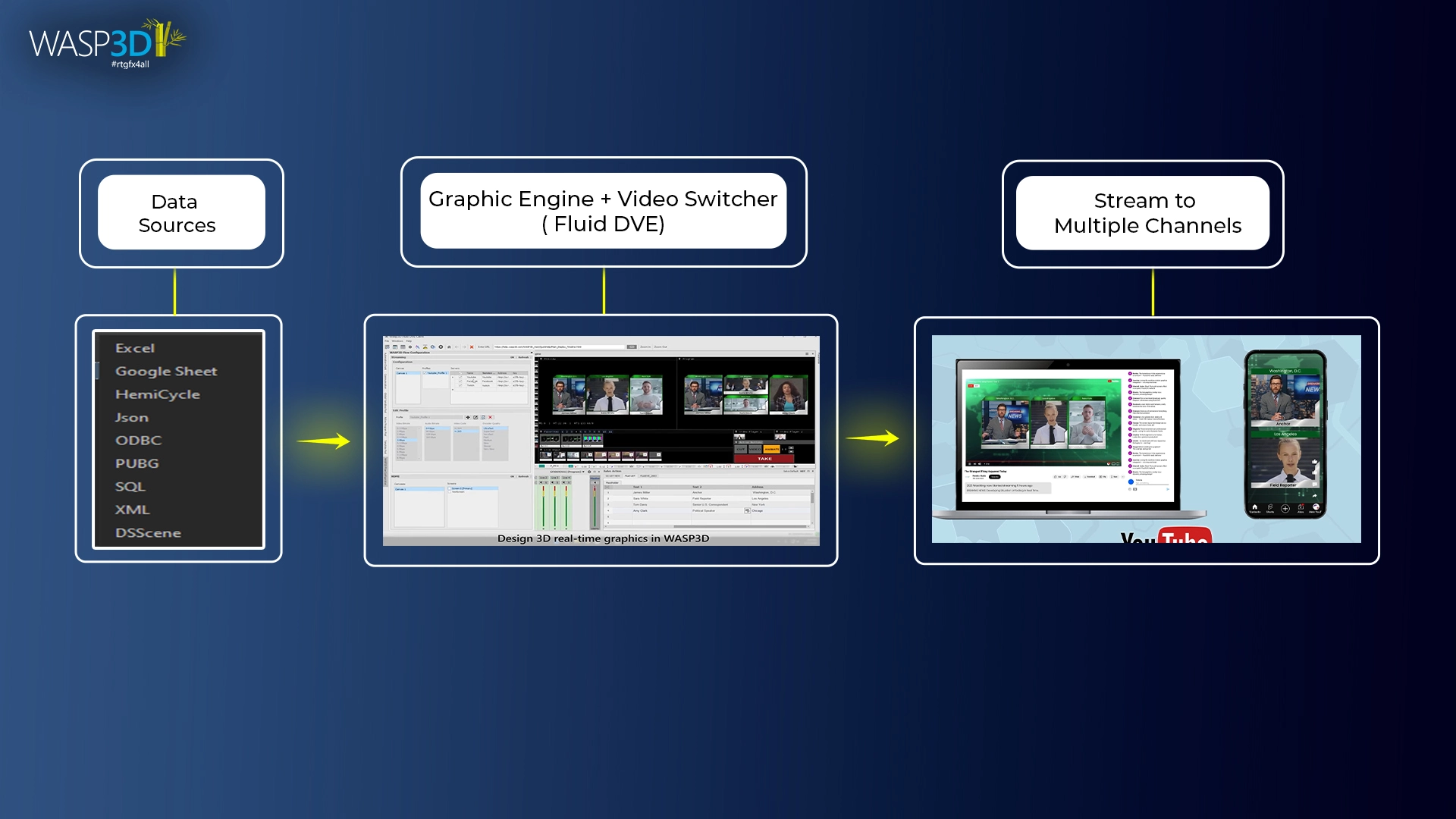
Professional environments often use dedicated graphics engines and integrated broadcast systems rather than general-purpose streaming software. Platforms like WASP3D Pro are designed for real-time 3D graphics, newsroom integration, sports data connectivity, and multi-output broadcast workflows.
Other paid ecosystems like WASP3D Fluid DVE combine switching, automation, and graphics into unified production environments, reducing the need for patchwork setups. These systems are built not only for visual quality but for operational reliability.
Workflow Comparison: How Production Structure Changes Needs
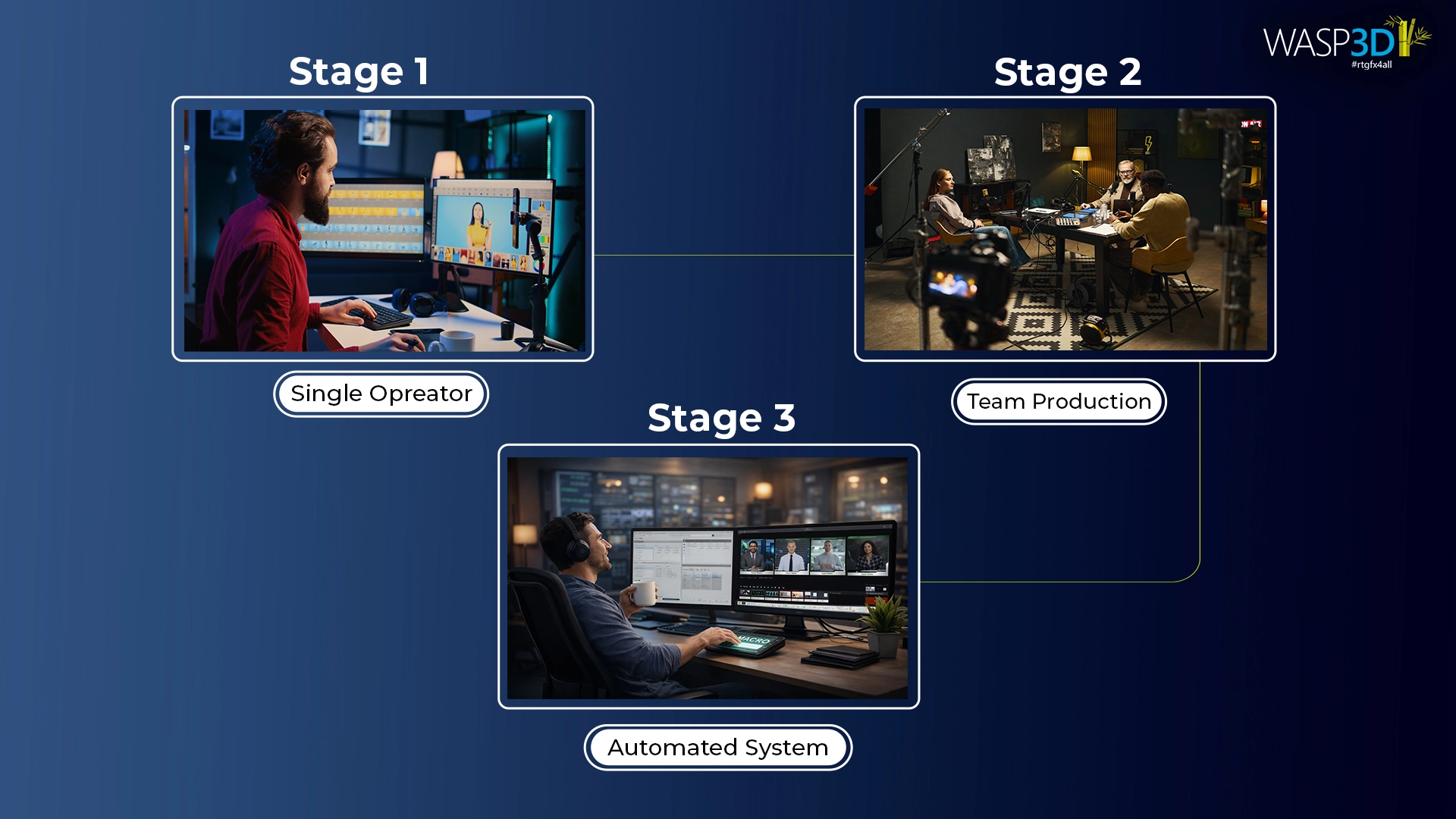
Single-Operator Manual Workflow
In smaller setups, one person handles streaming and graphics. Manual updates are feasible. The system must be simple and responsive.
Multi-Operator Coordinated Workflow
As productions grow, roles become specialized. A graphics operator works alongside a director and technical team. Systems must support coordinated control and structured layouts.
Automation-Driven Production Control
In advanced setups, automation reduces repetitive tasks. Triggers, macros, and data-driven updates streamline operations. The focus shifts from manual control to system orchestration.
How do free and paid tools differ in ease of use and workflow?
Free tools are usually designed for accessibility. Software like OBS Studio gives creators flexibility and control, but much of the workflow is manual — scene switching, plugin configuration, overlay management, and data updates often depend on the operator.
This works well for individual streamers or small teams, but under fast-paced production pressure, it can become complex. Paid tools are typically built around structured workflows.
They focus on automation, template control, multi-output routing, and integration with newsroom or sports data systems. Instead of managing multiple plugins, the system is engineered to reduce friction during live production. The key difference is not just features — it’s how smoothly the entire workflow operates when stakes are high.
Wasp3D Xpress vs Wasp3D Pro — Feature Comparison
| Capability / Feature | Wasp3D Xpress | Wasp3D Pro |
| Target User | Solo creators, small events, education | Broadcasters, agencies, high-frequency productions |
| Cost | Free | Paid (professional tier) |
| Real-Time Graphics | ✔ Yes | ✔ Yes (higher performance) |
| Template-Driven Workflow | ✔ Core Templates | ✔ Advanced Templates |
| Data Integration (API feed) | ✔ Manual data entry | ✔ Extensive (sports feeds, news data, databases) |
| Multi-Output Support (NDI, SDI, Fill/Key) | NDI Only | ✔ Professional output support |
| Multi-Operator Workflow | ⚪ Single operator | ✔ Designed for teams |
| Broadcast-Level Stability | ⚪ Good for light use | ✔ High-reliability long duration |
| Dynamic Score / Stats Graphics | ⚪ Manual | ✔ Advanced, data-driven |
| Brand Customization | ✔ Yes | ✔ Extensive |
| Use Case Examples | News YouTube streams, school events, social live shows | News channels with live data, pro sports streaming, corporate broadcast |
| Learning Curve | ✔ Easy to start | Comes with easy guides and support |
| Best For | Entry-stage productions | Structured, professional workflows |
Technical Considerations That Influence the Decision
Why Some Graphics Systems Feel Smoother During Live Events
Basic systems often rely on lightweight rendering suited for overlays. More advanced systems leverage GPU acceleration for smoother animation and frame-accurate output. Production intensity determines the requirement.
Real-Time Data Integration (API, Database, Scoring Systems)
Manual text entry may work at small scale. However, once live scoring systems, newsroom databases, or external APIs are involved, integration becomes a defining factor.
Multi-Output Support (SDI, NDI, HDMI, Fill & Key)
Smaller productions may output via HDMI or software capture. Broadcast environments often require SDI, NDI, or Fill & Key workflows to integrate with professional switchers.
Performance Stability Under High-Load Events
High-profile events place stress on systems — multiple animations, rapid updates, and long broadcast durations. Stability becomes a major consideration in selecting the right tool.
Increasing Streaming Frequency
Occasional streaming can operate comfortably on lightweight systems. As frequency increases, efficiency and automation become more valuable.
Integration with Video Switchers
Professional productions integrate graphics with switchers and production hardware. Compatibility becomes essential.
Real-Time Score and Statistics Requirements
Manual updates are manageable at small scale. Real-time integration improves speed and reduces risk as complexity grows.
How to choose the right live streaming/graphics software for your live event?
If You Are a Solo Streamer
A free, template-driven system likely meets your needs. Simplicity and speed are priorities.
If You Manage a Growing Sports Production
Evaluate your data requirements. Manual workflows may suffice initially, but integration and structured systems support long-term growth.
If You Operate a News or Broadcast Channel
Automation, integration, and professional outputs become essential components of your workflow.
If You Run a Multi-Client Production Agency
Scalability, template control, and structured workflows support consistent delivery across clients.
Conclusion
Grow Your Graphics as Your Production Grows
Choosing between free and paid live graphics software is not about superiority. It is about alignment. The right Live Graphics Software should support both your current needs and your future production goals. Your graphics system should reflect the scale, structure, and ambition of your production.
Choosing Capability Over Complexity
The right solution balances capability with operational simplicity. Overcomplicating a small workflow is unnecessary. Underpowering a growing one can create bottlenecks.
Building a Scalable Live Graphics Ecosystem
As your production evolves, your graphics infrastructure should evolve with it. Whether starting with a lightweight system or operating a full broadcast ecosystem, the goal remains the same: delivering clear, professional, and reliable visual storytelling. Ultimately, the right Live Graphics Software helps creators focus less on technical limitations and more on delivering engaging live content.
FAQ
What features should I look for in broadcast graphics software?
Look for real-time graphics, customizable templates, data integration, automation, and support for live production workflows. Solutions like WASP3D are designed to simplify these tasks.
What is broadcast and television graphics software?
Broadcast graphics software creates on-screen visuals such as lower thirds, tickers, scoreboards, and animations used in TV broadcasts and live streams.
Can you recommend tools for creating TV broadcast graphics?
Popular options include WASP3D Xpress for creators, WASP3D Pro for broadcasters, and OBS Studio for basic streaming workflows.
What are the best broadcast graphics packages for live TV production?
The best graphics packages offer real-time rendering, automation, data connectivity, and professional output support. WASP3D Pro is designed for these advanced broadcast requirements.
Is WASP3D compatible with OBS?
Yes. WASP3D Xpress can be used alongside OBS, making it easier to add professional graphics to live streams without a complex setup.
Can broadcast graphics software be used for sports production?
Yes. Broadcast graphics software is widely used for scoreboards, timers, player statistics, and real-time match graphics. WASP3D offers templates specifically designed for sports broadcasts.
Is free broadcast graphics software good enough for live streaming?
For many creators, free tools like WASP3D Xpress and OBS provide everything needed to create professional-looking live streams and broadcasts.
What is the difference between broadcast graphics software and streaming overlays?
Streaming overlays are typically static visual elements, while broadcast graphics software like WASP3D supports real-time updates, animations, automation, and professional production workflows.